 Skip to content

Bottom line: one B2B video shoot becomes more useful when the team plans the destinations before filming. Start with the decision each asset must support, then capture the interview answers, proof, framing, approvals, and ownership that destination needs. Do not promise a fixed number of clips; a smaller set of distinct, usable assets is better than a folder of near-duplicates.
Repurposing is not simply cutting a long video into shorter files. It means adapting a source asset for a different audience, format, or purpose. LinkedIn Marketing describes repurposing as modifying or reimagining a piece for a new purpose or audience; that is a helpful planning test for a B2B team. If a proposed clip has the same viewer, message, destination, and next action as the master video, it may only be a shorter version—not a new asset with a job.
This guide is for a marketing team that needs one production day to support a website, sales follow-up, LinkedIn, and nurture without pretending every organization needs the same deliverables. The practical question is not “How many clips can we get?” It is “What must a buyer see or understand at each destination, and what must be captured before the crew leaves?”
Start with a destination map, not a clip list
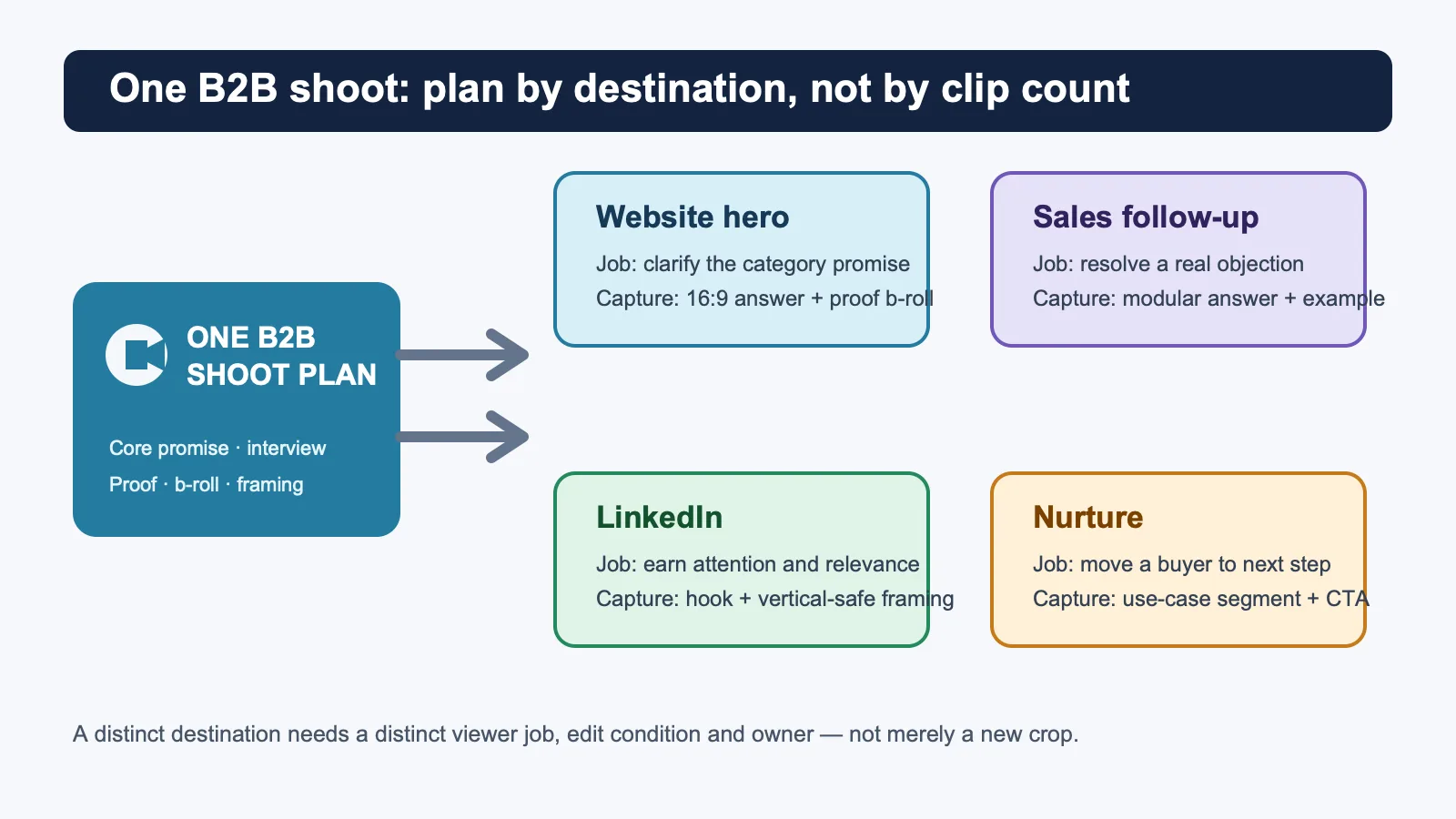
Give every destination one concise brief: its viewer, the decision that viewer is trying to make, the message it needs, the action it should enable, and the proof it can honestly show. This turns “repurposing” into a commissioning plan. It also lets sales, marketing, and production agree on what cannot be recovered later in the edit.
| Destination | Viewer job | What to capture | Owner after approval |
|---|---|---|---|
| Website hero or solution page | Understand the category promise | A clear 16:9 answer, relevant process or product b-roll, and a truthful CTA | Web or demand-generation lead |
| Sales follow-up | Resolve a specific objection | A self-contained answer, a concrete example, and a version that can be sent with context | Sales enablement or account team |
| Decide whether the insight is worth attention | A direct opening thought, vertical-safe framing, captions, and a useful post angle | Social or brand lead | |
| Nurture or resource hub | Take a next step after initial interest | A use-case segment, a next-question bridge, and a destination-specific CTA | Lifecycle or campaign owner |
That matrix is intentionally more demanding than a shot list. A 16:9 website answer may need room around the speaker for a headline or page layout. A LinkedIn cut may need an opening that works before the viewer knows the company. A sales follow-up can be narrower and more direct because the sender has already supplied context. Planning those differences early prevents a misleading crop from standing in for a purpose-built asset.
Write a reusable capture brief
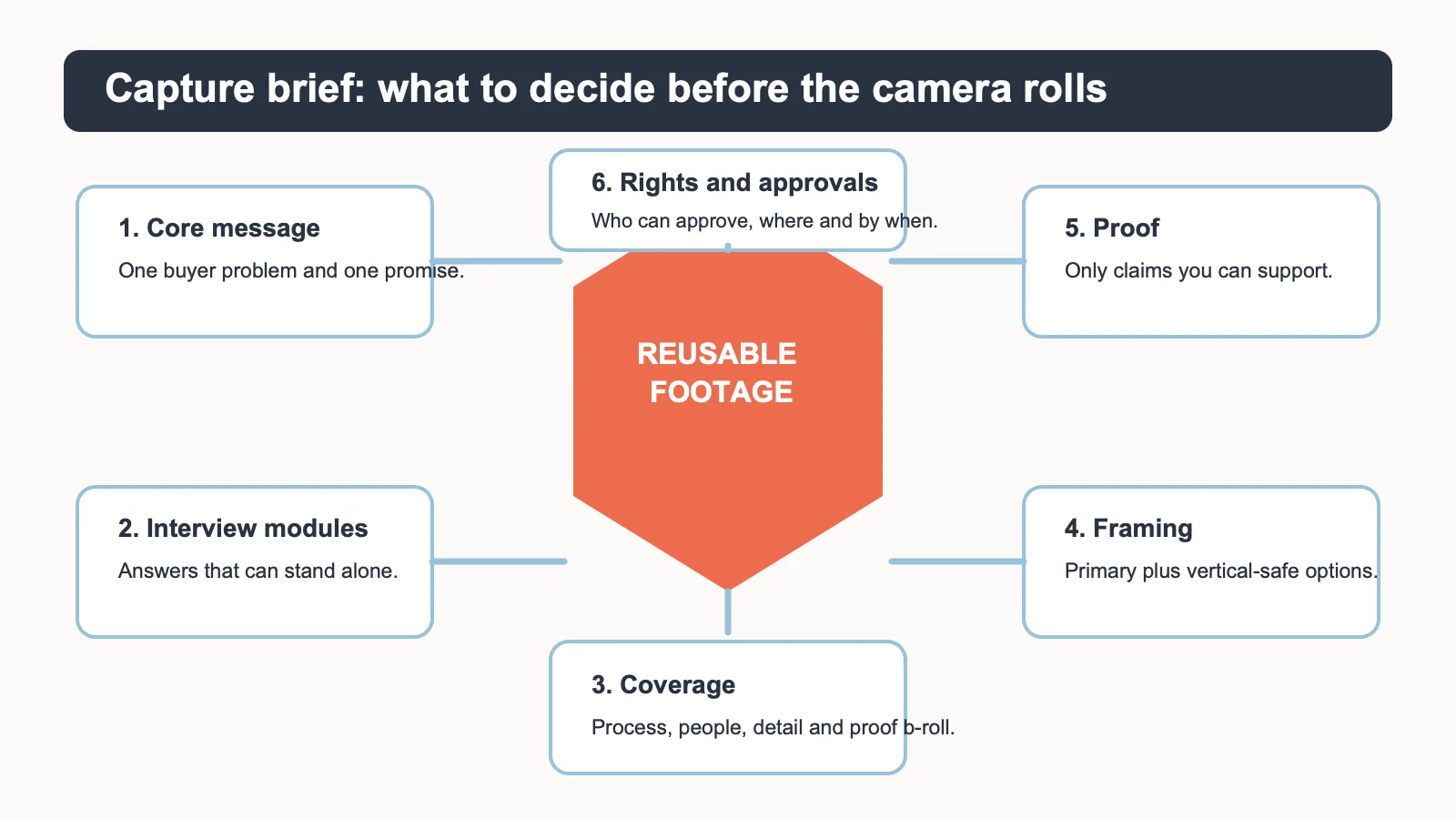
A reusable shoot does not need a bloated creative brief. It needs a short record that makes tradeoffs visible before the schedule locks. Put the core buyer problem and the central promise first. Then write interview prompts as modules: each answer should still make sense if it is used outside the full conversation. “Tell us about your company” is rarely modular enough. “What changes for a buyer when the handoff fails?” gives an editor a decision-shaped answer.
Next, name the proof you can actually show. That may be a process, a product interaction, a team workflow, an approved screen, a location with permission, or an illustrated explanation. It is not a license to invent customer outcomes, stage a false demonstration, or present illustrative media as a client record. If the proof is conditional, say so in the script and in the edit notes.
- Core message: one buyer problem, one promise, and the terms that need a plain-language definition.
- Interview modules: direct answers that can stand alone, plus the context that keeps them honest.
- Coverage: process, people, details, and proof b-roll that supports the actual message.
- Framing: the primary composition plus alternate coverage that preserves important faces, gestures, products, or on-screen evidence when a vertical cut is appropriate.
- Rights and approvals: who may approve a claim, person, location, screen, brand mark, and final edit—and by what date.
Capture for distinct edits, not just crops
Many repurposing plans fail when the team assumes the master interview can simply be cropped into every format. Cropping can help, but it cannot create missing headroom, a clear opening hook, a different sequence of proof, or a self-contained answer. Ask the production team to identify the required edit conditions instead: which answer needs a clean beginning, which subject needs alternate framing, which b-roll will make a claim understandable, and which version needs captions or an on-screen label.
Use the same discipline for b-roll. Capture it against an editorial purpose, not as generic filler. A website section may need a calm process sequence that reinforces a page promise. Sales follow-up may need a close view of the workflow a prospect asked about. LinkedIn may need a visual beat that earns a pause without making a claim the footage cannot support. Each request should say what it helps the viewer understand.
Teams that already publish vertical content can connect this planning approach with Nitro’s guidance on vertical video strategies for business growth and optimizing horizontal content for vertical platforms. The key distinction is timing: conversion choices made after a shoot are limited by what the crew captured, while a pre-production plan can make room for the intended edit from the start.
Run one alignment meeting before production
A short working meeting can prevent a long chain of after-the-fact requests. Invite the person responsible for the business message, the person who understands the buyer’s objections, the channel owners, and the production lead. The goal is not to make every stakeholder an editor. It is to make the decisions that affect the shoot while the schedule, locations, subjects, and equipment can still change.
Ask each owner to bring one destination and one decision. The website owner might need a concise explanation of a category problem. A salesperson might need an answer to the question that regularly slows a qualified conversation. The LinkedIn owner might need an insight with a natural opening line, not a summary of the whole shoot. A lifecycle marketer might need a short segment that makes the next resource or conversation feel relevant. When two destinations demand incompatible messages, treat that as a planning choice: add a separate interview module, change the script, or decide one destination is out of scope.
Close the meeting with a written “must capture” list and a “nice to have” list. The first list should be small enough to protect it if the day runs late: named answers, specific proof b-roll, an alternate framing requirement, and any approved screen, person, location, or product detail. The second list can include experimental hooks or supplementary coverage. This is a better safeguard than assuming a generic wide shot can solve every later request.
Keep the message consistent, but do not duplicate every edit
Consistency means the website, sales, LinkedIn, and nurture versions share the same truthful positioning. It does not mean they use the same opening, length, sequence, or call to action. A website visitor may need orientation first. A prospect who received a sales follow-up may need proof or clarification first. A LinkedIn viewer may need a concise idea that earns attention before any brand context. A nurture recipient may need a bridge to a next question. The master interview gives the team source material; it should not force every destination to behave like the master.
Document the relationship between versions so changes do not create conflicting claims. If the website version says a workflow applies to a defined use case, do not let a shorter social cut remove the limitation and sound universal. If a sales cut makes a product-specific statement, keep the approval note with that version rather than copying it into a general brand asset. The editorial question for every edit is simple: would the intended viewer understand the point, its scope, and the next action without the missing context?
Make approval part of the asset
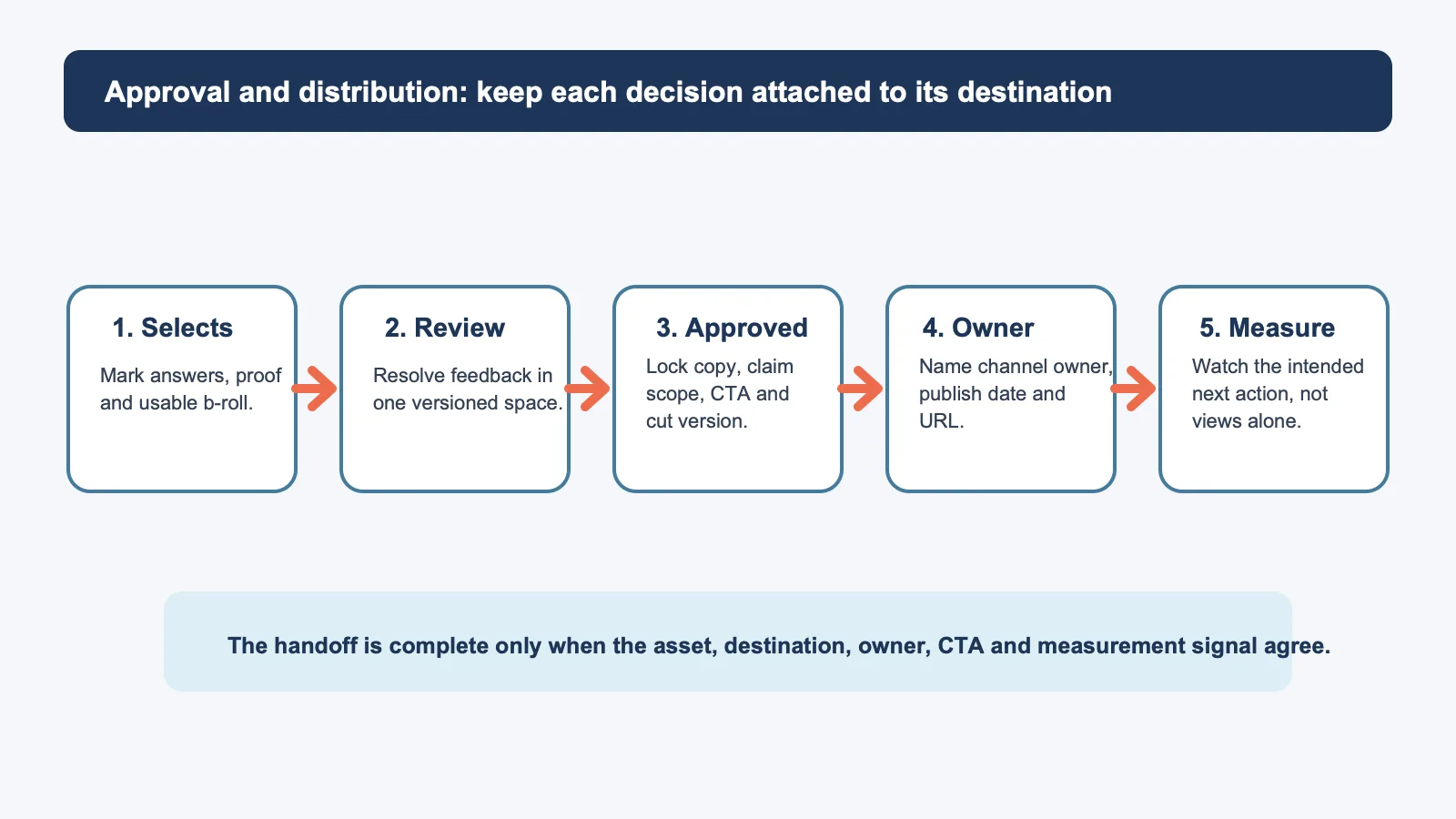
Approvals should not live in a vague final-review stage. Record the reviewer, the version, the specific destination, the claim scope, and the deadline. That protects both speed and accuracy. A strong website edit may be held by a legal qualifier; a social cut may need brand review; a sales clip may need a product owner to confirm the language. Those are different decisions, so they should not be buried in one mixed comment thread.
Assign one person to move each approved asset forward. “Marketing owns it” is not an owner. Name the person or role responsible for the destination URL, the post, the email placement, the sales library, or the campaign. Then name the measurement signal that matters. A sales follow-up might be judged by qualified replies or a next meeting; a website video by the next page action it is meant to support; a LinkedIn asset by the quality of engagement and click-through context rather than a view total alone.
Choose tools by the bottleneck, not by the brand
Disclosure: the three links below go to official product pages. They are direct, untracked links; this guide contains no affiliate purchase links. These tools are examples for separate workflow bottlenecks, not a ranked three-product recommendation or evidence of hands-on testing.
For review and approval: Frame.io
Frame.io is worth evaluating when feedback, versions, and approval decisions are getting detached from the work itself. Its official overview describes a central workspace for creative work, feedback, versions, and approvals. Use it when multiple stakeholders need a clear versioned review path; skip it if an existing digital-asset or project-management system already supplies the required review controls and the team will actually use them.
For transcript-led clip selection: Descript
Descript is an example to evaluate when the team needs to find, rearrange, and propose concise interview moments from a transcript. Its official product page presents text-based editing for video. Use it when the edit team benefits from reviewing language before committing to a cut; skip it when the project requires an established broadcast or post-production workflow that the team already operates well.
For a website video destination: Wistia
Wistia is an example to evaluate when the bottleneck is hosting, organizing, and presenting video on a business site. Its official product page describes a video hub for keeping videos and webinars organized, on-brand, and ready to share. Use it when the website destination needs a deliberate video experience; skip it when the current hosting and analytics setup already meets the page, privacy, and reporting requirements.
The important decision is not whether a team owns all three products. It is whether the production plan names a review system, a way to find usable moments, and a reliable destination for the final asset. Evaluate current pricing, availability, privacy, accessibility, integrations, and team adoption directly with the vendor before committing to a tool.
Use a simple post-shoot handoff checklist
- Label the master footage, interview modules, b-roll, music, graphics, and permissions so the editor can find the approved inputs.
- Mark promising moments by the destination they could serve, not only by their timestamp.
- Create one review version per decision path, with a clear owner and deadline.
- Lock the copy, claim scope, CTA, and destination before a file is marked final.
- Publish the right version to the right location, then record the next action or measurement signal that decides whether the asset earned another iteration.
When the production partner is still being selected, pair this brief with Nitro’s B2B video production agency buyer’s brief. The agency-selection conversation asks who can execute the work; this distribution plan tells that partner what the footage needs to accomplish after the shoot.
A better definition of repurpose
Repurposing is successful when one shoot produces several truthful, audience-appropriate decisions—not when it produces the largest file count. A destination map, modular interview prompts, purposeful coverage, named approvals, and a measured handoff give a B2B team a practical way to commission that work. If your team needs help turning a launch, customer story, thought-leadership topic, or sales question into a production and distribution plan, start a conversation with Nitro Media Group before the shoot schedule is fixed.


