 Skip to content

Guest contribution by Rabbit SEO, edited by Nitro Media Group for clarity and accessibility.
Local SEO is often discussed as a technical discipline built around titles, keywords, listings and links. Those elements matter, but they do not tell the whole story. A local service business also needs to show people what it does, where it works and why a visitor should trust it. Professional photography and video can supply that proof while giving a website stronger, more useful material for location pages, service pages, business profiles and educational content.
This connection is especially relevant for businesses whose work is visual or difficult to explain in a few sentences. A commercial video producer, real-estate photographer, contractor, venue, clinic, restaurant or event company can all benefit from original media that documents real services. The objective is not to add large files to every page or assume that a polished video automatically improves rankings. It is to plan each visual asset around a real customer question and place it on a page with a clear search purpose.
For a company such as Nitro Media Group, the public service mix includes commercial videography, photography, drone footage, event coverage, livestreaming and real-estate media for San Antonio and Austin. Those categories naturally create different search intents. Someone looking for corporate event coverage has a different need from a real-estate agent seeking property photos or a business planning an aerial project. A useful local SEO structure should preserve those distinctions.
Tools such as Rabbit SEO can help teams audit page structure, review on-page elements and organize recurring SEO work. The human task remains deciding which services deserve separate pages, what evidence belongs on each page and whether every visual accurately represents the business. No software, photograph or video can guarantee a ranking, a lead or a citation in an AI-generated answer.
Start with the search intent, not the camera
Good visual SEO begins before production. The team should first identify the page that will use the asset and the question that page must answer. A homepage may need a short overview of the business. A service page may need a concise demonstration of the process. A location page may benefit from recognizable local context. A portfolio page may need examples grouped by service rather than one mixed gallery.
This planning prevents a common problem: creating attractive media without a permanent destination. A video posted only on social media may have a short useful life. The same video, when embedded on a relevant service page with an accurate heading, transcript, supporting copy and contact path, becomes part of a durable resource. The page can be shared, linked internally, revisited by prospects and understood by search systems.
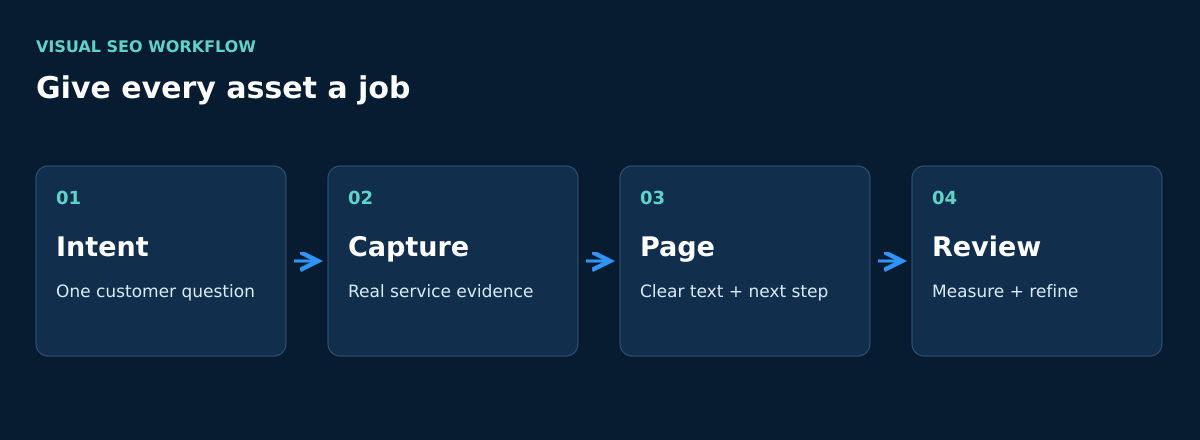
Each asset should therefore have a job. It may explain a production process, answer a pricing question, show the physical environment, introduce the team, document an event or demonstrate the difference between service options. If the job cannot be stated clearly, the asset may not need to be created yet.
Build a page structure that reflects real services
Local businesses often try to make one page rank for every service and every city. The result is usually a crowded page with weak topical focus. A clearer approach is to create a core page for each substantial service, then connect those pages through useful internal links.
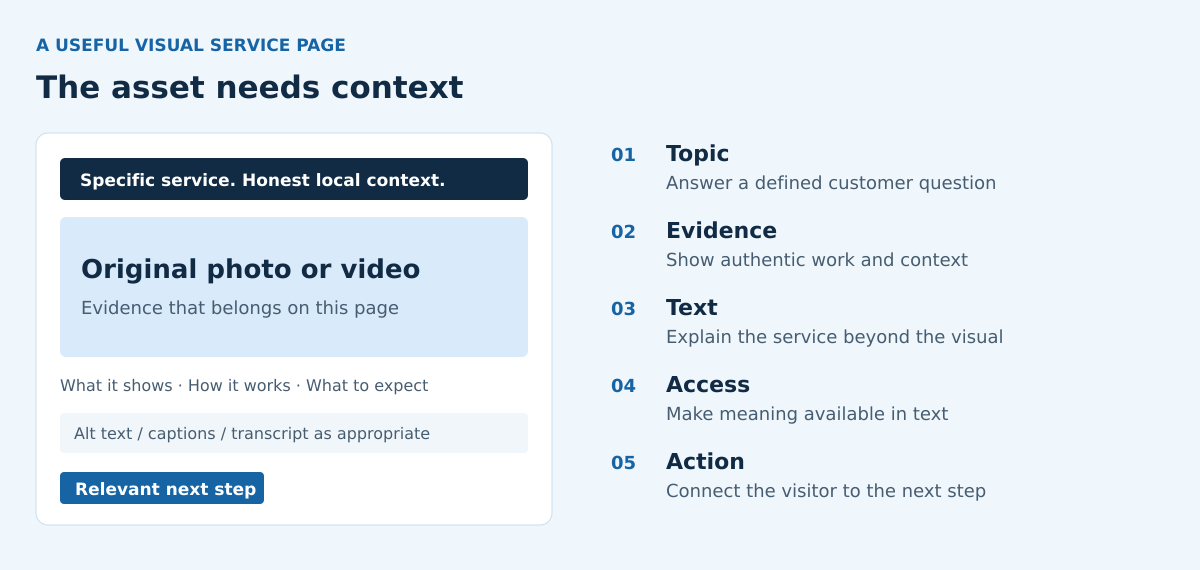
For a media-production company, commercial video, event coverage, livestreaming, drone work and real-estate photography can each justify distinct content when the service, audience and deliverables differ. A service page should explain who the service is for, what the process includes, what the client receives, which geographic area is served and how to request the next step. Original photographs and short videos can support those explanations, but they should not replace them.
The homepage can introduce the main categories and link to the corresponding service pages with descriptive anchors. A blog post about planning a corporate event can link to event coverage. A guide about property marketing can link to real-estate photography and video. This makes navigation clearer for visitors and helps search engines understand the relationship between educational content and commercial services.
Use original photography as evidence
Stock photography can make a page look polished, but it rarely proves that a local company performed the work shown. Original photography can document people, equipment, locations, deliverables and working conditions. That makes the page more specific and can reduce the gap between a broad marketing claim and visible evidence.
The strongest photo sets are planned around the page. A corporate-video page might show pre-production planning, lighting, audio capture, filming and editing. A drone-services page might show equipment, safe setup and the type of aerial perspective delivered. A real-estate-media page might organize examples by exterior photography, interior photography, video walkthroughs, drone footage and three-dimensional tours.
Images also need practical web preparation. File names should describe the subject in plain language. Alternative text should explain the image for accessibility without stuffing a list of cities or keywords. Dimensions should fit the layout, and compression should reduce file weight without making the work look poor. Decorative images can use empty alternative text when appropriate, while meaningful examples should have concise descriptions.
Make video understandable on the page
A video can communicate movement, atmosphere and process more efficiently than a still image. Supporting text also helps visitors and search systems understand what it contains. Give important embedded videos a clear title, a short introduction and a useful summary. Provide accurate captions and a transcript when needed for an accessible experience; a summary does not replace them.
A transcript should faithfully represent the speech and meaningful non-speech audio. Paragraph breaks, headings and speaker labels can make it easier to read without removing information. A separate summary can condense the main points, such as the brief, schedule, location considerations, crew requirements, approvals and final deliverables of a commercial shoot. Label condensed text as a summary. When important visual information is not conveyed in the audio, include it in a descriptive transcript.
Video structured data can describe the real video’s title, description, thumbnail and upload date, with other accurate details such as duration where appropriate. It must match the visible content and must not invent ratings, views, prices or outcomes. Embedding a video or adding valid markup does not guarantee indexing or a rich result. Google’s video features also depend on eligibility, including a watch page whose main purpose is showing the video. A service page with a supporting video can still be useful without qualifying as a video watch page.
Connect visual assets to local business facts
Local relevance comes from consistent, verifiable information rather than repeating a city name. The website, business profile and major listings should agree on the company name, service area, phone number, contact details and primary categories. Visual content can reinforce those facts when it shows real projects and is published on the correct service or location page.
A San Antonio project gallery, for example, should not be a list of city names attached to unrelated images. It should provide context: the type of project, the service delivered, the constraints considered and what the viewer can learn from the example. If the company also serves Austin, the website should explain that coverage honestly and avoid creating near-identical city pages with only the place name changed.
Google Business Profile can also reuse selected photographs and short clips, provided they accurately represent the company. The profile should link to the most relevant page when possible. Photos of a team, workplace, event setup or completed service can help a potential customer understand the business, but they do not replace complete profile details or genuine customer feedback.
Create assets that can be reused without becoming repetitive
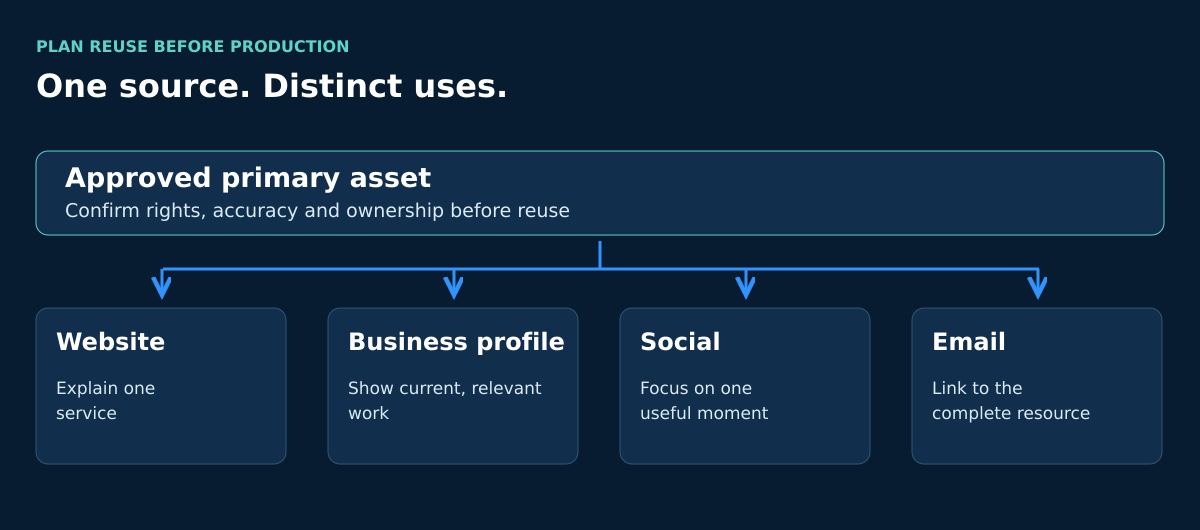
A well-planned production day can generate several useful formats. A long interview can support a service-page video, short clips, still frames, an FAQ, a process article and sales material. A property shoot can produce listing photography, a walkthrough, vertical clips and an educational post about preparing a property for media.
Reuse should be deliberate. Posting the same caption, title and clip everywhere adds little value. Each destination needs an appropriate introduction and next action. The website version should support a defined page topic. The business-profile version should be concise and current. The social version may emphasize one visual moment. The email version may direct an existing audience to the complete resource.
An editorial calendar can map one primary asset to these supporting uses. This reduces waste while keeping the website coherent. It also gives the team time to confirm permissions, releases, music rights, location restrictions and client confidentiality before publication.
Support search and AI-assisted discovery with clear answers
People now discover local businesses through traditional Google results, map listings, Google AI Overviews and conversational systems such as ChatGPT, Gemini, Perplexity and Copilot. These systems may interpret pages differently, and no business can guarantee inclusion. Clear factual content gives them a better source to evaluate.
Visual pages should answer practical questions in text: What does the service include? Which locations are covered? Who is the service designed for? What should the client prepare? What deliverables are available? How long does the process usually take when that information can be stated accurately? What factors affect scope? Direct answers are more useful than broad claims such as “best quality” or “guaranteed results.”
A recurring review with SEO software for small businesses can help a website owner notice missing titles, weak descriptions, broken internal links and pages that need clearer organization. This is an available workflow, not evidence that Nitro Media Group used a specific feature or achieved a particular outcome. Human review is still needed to confirm that every recommendation fits the real service and audience.
Measure the page, not just the production
It is difficult to attribute a local SEO result to one photograph or video. Many factors change at once: page structure, competition, links, reviews, seasonality and search behavior. Measurement should therefore focus on the complete page and the visitor journey.
Useful indicators can include impressions for relevant service-and-location queries, clicks to the page, engagement with the embedded media, contact-form starts, calls, booking requests and assisted conversions. Before drawing conclusions, confirm that analytics events work and that the page has had enough time and traffic to produce meaningful data.
Qualitative evidence matters too. Sales teams can record which questions prospects still ask after viewing the page. If visitors repeatedly misunderstand the service, the page may need a clearer explanation or a different visual sequence. If a video answers the question but the surrounding page does not, the summary and headings should be improved.
A practical visual SEO workflow
- Choose one service and location intent. Define the audience and the exact question the page must answer.
- Review the existing page. Check the title, main heading, copy, internal links, images, video embeds and contact path.
- Create a shot list tied to the page. Include process details, people, equipment, environment and deliverables that can be shown accurately.
- Prepare web versions. Compress images, use descriptive file names, write accessible alternative text and create thumbnails.
- Add supporting text. Introduce the asset and explain what it shows. Label a summary clearly, and provide accurate captions and transcripts as needed for accessibility.
- Connect related pages. Link from the homepage, relevant services, location pages and educational posts without forcing anchors.
- Check business consistency. Confirm that website and profile details match.
- Measure and refine. Review search visibility, engagement and real inquiries, then update unclear sections.
Strengths, limitations and human judgment
Professional media can make a local business easier to understand. It can show real services, give important pages original material and support useful explanations across several channels. A planned library of photographs and videos also gives the business more flexibility than relying on generic stock assets.
The limitations are equally important. Large files can slow a page. Autoplay can frustrate visitors. Decorative galleries can hide the main message. A beautiful reel may generate attention without answering a buying question. Visuals can also become outdated when teams, locations or services change.
That is why production, web design and SEO should not operate in isolation. The producer understands the footage, the business owner knows what is accurate, the web editor controls presentation and the SEO reviewer checks structure and discoverability. The best result is not the page with the most media. It is the page where every asset supports a clear, honest purpose.
Frequently asked questions
Can professional photography improve local rankings by itself?
No. Original photography can improve clarity, trust and the usefulness of a page, but rankings depend on many factors. The images should support accurate service content, sound technical setup, consistent business information and an ongoing local SEO process.
Should every local service have its own video?
Not necessarily. Create a video when movement, process or explanation materially helps the customer. A short, focused video on a strong service page is usually more useful than several generic videos with no clear destination.
How should a San Antonio or Austin business use location footage?
Use recognizable local context only when it is relevant and permitted. Explain the project or service connected to the location. Avoid attaching city names to unrelated media or producing duplicate city pages that provide no distinct value.
Do video transcripts need to include every spoken word?
A transcript should preserve the speech and meaningful audio information. Improve punctuation, paragraphing and speaker labels for readability; do not silently remove substantive content. A shorter overview should be labeled a summary. A summary does not replace captions or other accessibility alternatives, and a descriptive transcript may need to explain important visual information too.
Can photography and video guarantee visibility in AI answers?
No. Google AI Overviews, ChatGPT, Gemini, Perplexity and Copilot choose and summarize sources differently. Clear text, accurate business facts and well-organized media can make a page easier to interpret, but they cannot guarantee a citation or recommendation.
Conclusion
Professional photography and video support local SEO when they are planned as evidence, attached to a specific page purpose and surrounded by accurate information. The most useful assets answer real questions, show real services and connect naturally to the rest of the website.
For service businesses, the practical opportunity is to stop treating production as a one-time promotional event. A thoughtful visual library can strengthen service pages, location content, business profiles, educational articles and sales conversations. Continued review is essential: compress the files, maintain accurate details, measure the complete page and revise content as the business changes. That disciplined process is more valuable than making promises about rankings or relying on visuals alone.
Planning a service page or a visual library around real customer questions? Talk with Nitro Media Group about the project.
For implementation details, see Google’s video SEO guidance and W3C’s transcript guidance.


