 Skip to content
Published after the WWDC 2026 keynote: June 8, 2026 at 3:58 PM CDT. Apple said a lot at WWDC 2026, but the omissions are almost as important as the announcements. For the full announcement-by-announcement rundown, start with our WWDC 2026 recap; this post is the companion piece about what Apple did not announce, did not fully explain, or deliberately kept for later.
That distinction matters. A keynote is not just a list of features. It is a priority map. Apple chose to spend WWDC 2026 on Siri AI, Apple Intelligence, iOS 27, macOS Golden Gate, Liquid Glass refinements, search, child-safety controls, developer tools, and platform polish. It did not spend the keynote launching a new hardware lineup, explaining every AI partner boundary, publishing exact usage quotas, or turning Tim Cook’s leadership transition into a farewell show.
For Apple users, that means the next few months are about software testing rather than immediate hardware buying. For creators and marketers, it means Apple Intelligence is interesting, but not yet a blank check for production workflows. For developers and IT teams, it means the gaps are the work: availability, policy, app integration, privacy documentation, device support, and rollout timing.
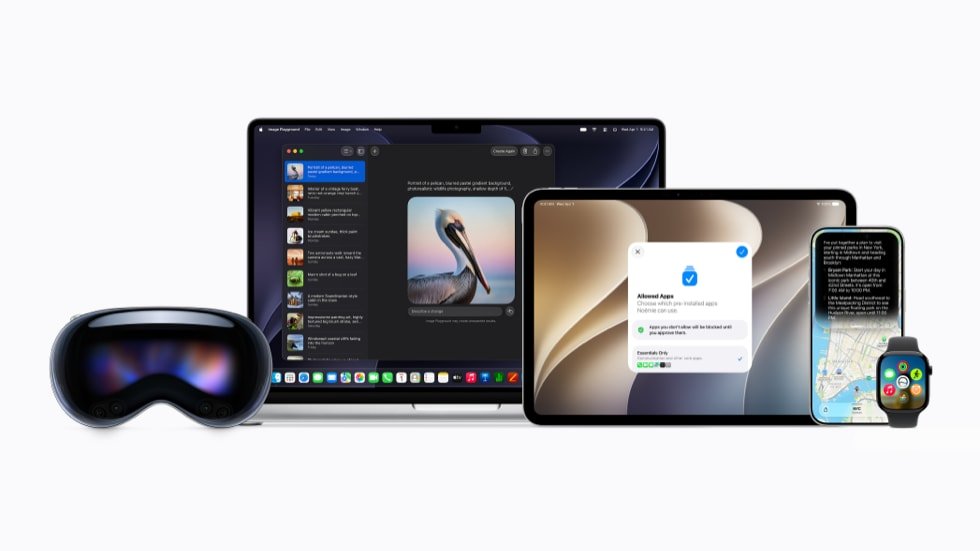
The Quick List: What Apple Didn’t Fully Mention
| What was missing | What Apple left open | Why it matters |
|---|---|---|
| New consumer hardware | No new Mac, iPad, Apple Watch, Vision, AirPods, Apple TV, HomePod, or phone hardware launch was part of Apple’s official WWDC recap. | Do not treat WWDC as a buying-trigger event. Hardware decisions still point to Apple’s later product calendar. |
| A firm public release day | Apple gave the usual developer testing, public beta next month, and fall update window, but not final public dates. | Creators, IT teams, and small businesses should test on secondary devices and wait for stable releases before rolling out. |
| Full Siri AI rollout clarity | Apple says Siri AI is in developer testing now and beta later this year, with regional limits in the EU and China. | Plan for uneven availability by device, language, country, and beta stage. |
| Exact AI usage quotas and pricing | Apple says some image-generation features have daily usage limits and that most iCloud+ plans increase access, but did not publish exact quotas in the main recap. | Marketing and content teams should avoid building production promises around undefined daily AI capacity. |
| Complete model-provider transparency | MacRumors captured Apple saying it collaborated with Google/Gemini live, while Apple’s written recap keeps the provider details out of the headline explanation. | Teams with privacy, procurement, or client-data requirements should wait for full technical and legal documentation. |
| A DMA or App Store policy reset | Apple announced developer growth tools, but WWDC did not become a broader App Store policy, fee, or third-party assistant roadmap. | Developers should treat new App Store tools separately from unresolved regulatory and business-policy questions. |
| A big CEO succession moment | Apple had already announced that John Ternus becomes CEO on September 1, 2026, but the keynote did not turn Tim Cook’s likely final WWDC as CEO into the main story. | The company kept the focus on software and developers, even though the leadership transition is a major backdrop. |
The tone here should be fair. WWDC is a developer conference, and Apple often keeps hardware for separate product events. Still, WWDC 2026 carried more pressure than usual because Apple had to answer two big questions at once: can Siri catch up in the AI era, and can Apple show a smooth transition into the John Ternus CEO era? Apple answered part of that. It did not answer all of it.
The Quiet iOS 27 Features Apple Barely Highlighted
The first version of this article focused too much on the empty spaces around WWDC: no hardware, no exact release dates, no clean AI quota table, no full policy reset. That was useful, but it missed another kind of omission. Apple also announced a lot of smaller iOS 27 and platform features that did not get the same oxygen as Siri AI, but could matter more in daily use.
These are not rumor features. They are pulled from Apple’s own iOS 27, iPadOS 27, macOS 27 Golden Gate, watchOS 27, and WWDC26 pages. They are the practical layer under the keynote: browser alerts, password cleanup, better network decisions, smarter search, better shared albums, richer parental controls, and small Apple Watch utility changes.
| Quiet feature | Where Apple lists it | Why it matters |
|---|---|---|
| Safari Notify Me | iOS 27, iPadOS 27, macOS 27 | Safari can watch a page for things like price changes or restocks and alert the user when it is time to act. |
| Passwords one-tap fixes | iOS 27, iPadOS 27, macOS 27 | Passwords can flag weak or compromised passwords and update them with less manual friction. |
| Describe a shortcut | iOS 27 | Users can describe an automation in plain language instead of building every shortcut step manually. |
| Write with Siri and automatic proofreading | iOS 27, iPadOS 27, macOS 27, Siri AI page | Siri AI can draft text where users type and offer system-wide proofreading, including in many third-party apps. |
| Custom Siri voice controls | iOS 27 and supported Siri AI devices | Users can tune Siri expressivity and pace, which matters for accessibility and everyday comfort. |
| Siri mode in Camera | iOS 27 on supported devices | Camera becomes an input for Visual Intelligence, not just a capture tool. |
| Shared Albums upgrades | iOS 27, iPadOS 27, macOS 27 | Android and Windows contributors can join through iCloud.com, with full-resolution sharing support. |
| Search rebuild | iOS 27, iPadOS 27, macOS 27 | Spotlight, Photos, and Mail get a more stable and comprehensive content index. |
| Performance updates | iOS 27 and iPadOS 27 | Apple cites faster app launches, faster new-photo loading, faster AirDrop, and faster external-drive work on iPad. |
| Ask to Browse and Time Allowances | iOS 27, iPadOS 27, macOS 27, with watchOS/visionOS display behavior | Parents get more granular web, app, communication, and schedule controls. |
| Call Context and Wallet passes | watchOS 27 | Apple Watch can surface relevant call information and create passes from QR/barcode memberships. |
Safari Notify Me could become a quiet shopping and research tool
Apple’s iOS 27 preview says Safari can automatically spot what a user is interested in on a webpage, such as a price change or a restock, and alert them when it is time to act. Apple did not build the keynote around this, but it is one of the more practical features for normal people. Instead of keeping a product tab open, refreshing a vendor page, or signing up for another store’s emails, the browser itself can help track a page-level change.
For creators and small businesses, this can be more than personal shopping. It can help monitor gear availability, ticket pages, venue listings, client references, limited production tools, parts, accessories, or vendor pages. It also points to a bigger Apple direction: Safari is not just a passive browser. It is becoming a context-aware assistant surface.
Passwords gets closer to automatic cleanup
Apple’s iOS, iPadOS, and macOS preview pages describe a Passwords app improvement that can alert users to weak or compromised passwords and update them on the user’s behalf with less hassle. That is not a flashy WWDC demo, but it may be one of the most useful security upgrades for families and small teams.
The small-business implication is obvious. Many teams do not have a formal password manager rollout, and many owners inherit years of reused passwords, vendor accounts, shared logins, and weak credentials. Anything that makes password cleanup less painful can reduce risk. It still does not replace a real team password policy, but it gives Apple users a stronger default lane.
Shortcuts can start from a plain-language description
Apple’s iOS 27 page lists a “Describe a shortcut” feature: users can describe a daily task and have the system help automate it. This is the kind of feature Apple should have highlighted harder, because Shortcuts has always been powerful but intimidating. If iOS can turn normal language into a starting automation, more people may actually use it.
For marketers and creators, this matters because many repeat workflows are not glamorous enough to justify custom software. Think saving shoot notes, starting a content checklist, resizing a reminder sequence, opening a recurring publishing stack, logging a lead, or preparing a post-production routine. If the barrier drops from “build the shortcut step by step” to “describe the routine,” more teams will automate the boring parts.
Write with Siri brings writing assistance into everyday apps
Apple’s Siri AI page makes another quiet iOS 27 detail explicit: users can write with Siri AI virtually anywhere they type. Apple says Siri AI can generate a draft from scratch, refine what a user has already written, and automatically proofread across the system, including within most third-party apps.
That is bigger than a nicer Messages demo. If it works well, Apple is turning writing assistance into an operating-system layer for email, notes, client replies, captions, internal updates, and daily admin work. For creators and small businesses, the value is not just faster writing. It is having a first-pass assistant close to the work instead of needing to copy text into a separate tool.
The caution is the same one every team should apply to AI writing: treat it as draft support, not final authority. Brand voice, legal claims, client promises, pricing, and sensitive context still need human review. Apple’s system-level approach may reduce friction, but it also makes review habits more important because the assistance can appear in so many everyday places.
Siri voice customization is an accessibility and comfort feature
Apple’s iOS 27 page also lists the ability to customize how Siri sounds, including expressivity and pace. That is easy to dismiss, but voice interfaces are personal. A voice assistant that speaks too slowly, too quickly, too flatly, or with the wrong tone can be annoying enough that people stop using it.
This is one of those details that fits Apple’s broader accessibility history. It gives users more control over how an assistant feels in everyday life. For people who use Siri frequently, or for users who rely on voice interaction because typing is harder, pacing and expressivity are not decoration. They are usability.
Siri mode in Camera makes Visual Intelligence more practical
Apple did highlight Visual Intelligence, but the practical iOS 27 detail is that Siri mode is integrated directly into Camera. That matters because the Camera app is already where people capture objects, places, receipts, menus, signs, gear, locations, and visual references. The feature is less “AI demo” and more “what can my phone understand about what I am seeing right now?”
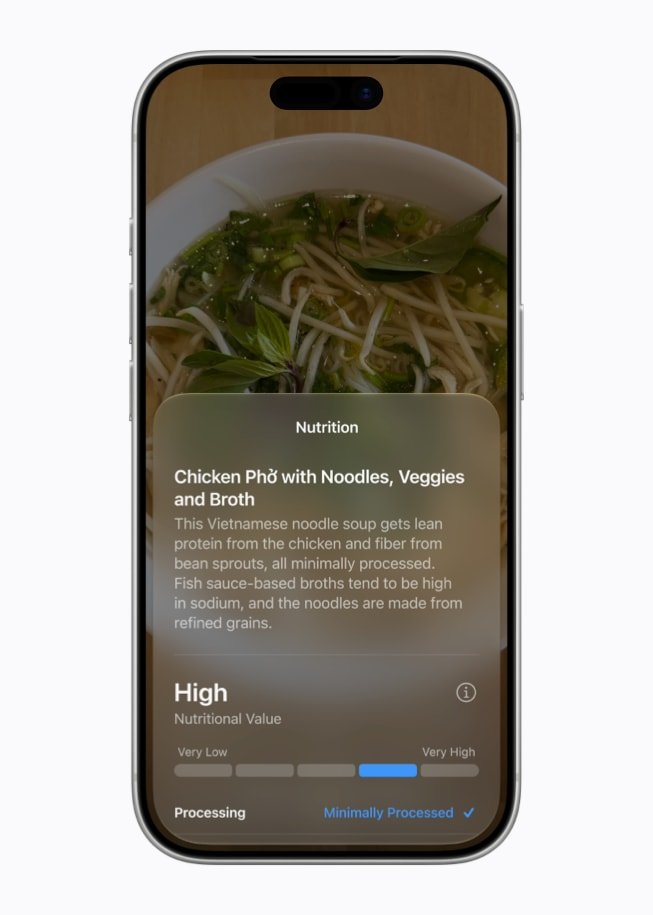
For production work, this could turn the phone into a better scouting and note-taking layer. A creator could capture a location and ask for context. A small business owner could photograph a display, document, sign, meal, fixture, or product shelf and begin a note or action from there. The important unanswered question is reliability, but the feature itself is more grounded than a generic chatbot prompt.
Search improvements may matter more than the AI headline
Across Apple’s official pages, the rebuilt search foundation shows up repeatedly. Apple says Spotlight, Photos, and Mail are getting a more stable, efficient, and comprehensive index, with Mail gaining a more relevant ranking system. That sounds boring until you remember how often people lose time hunting for an old email, receipt, attachment, text, image, or note.
For creators, better search means finding the right shot, location reference, client email, or production note faster. For marketers, it means campaign assets and approvals are easier to retrieve. For small businesses, it means less time digging through inbox history. This is the sort of feature that does not win the keynote but can make the device feel dramatically better after a few weeks.
Performance and network changes are real quality-of-life updates
Apple’s official recap and iOS page include the performance layer: apps launch up to 30% faster, newly captured photos load in Photos up to 70% faster, and AirDrop transfers are up to 80% faster. iPadOS adds up to 5x faster browsing and transfers for files on external drives. Apple also says iOS 27 and iPadOS 27 can make smoother decisions between Wi-Fi and cellular connections.
That is a much more useful story than it looks. Faster AirDrop matters on shoots, events, client reviews, and family gatherings. Faster Photos loading matters when someone is trying to share a shot right after taking it. Better network transitions matter when a phone clings to a weak Wi-Fi network at the worst possible time. None of this is as loud as Siri AI, but it is exactly the kind of friction removal users actually feel.
Shared Albums become more useful for mixed-device groups
Apple’s iOS, iPadOS, and macOS pages all call out improved iCloud Shared Albums. Friends and family on Android or Windows can join and contribute through iCloud.com, full-resolution sharing is supported, and Apple mentions new ways to filter and react inside albums.
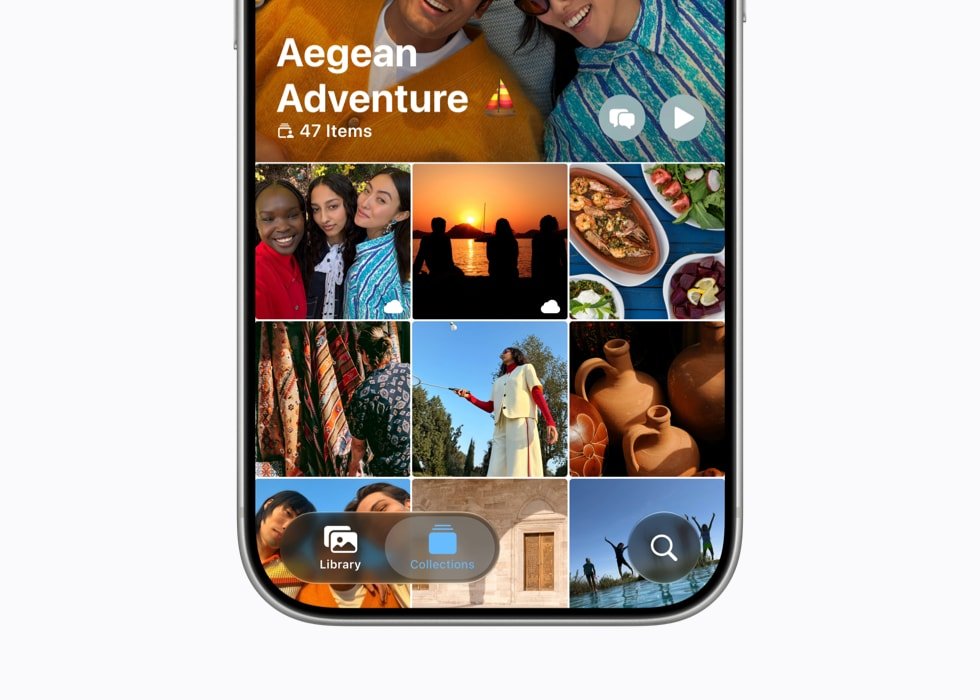
This is a big quiet feature for real-world groups because most groups are mixed-device groups. Families, event teams, clients, volunteers, schools, and small businesses rarely live entirely inside one ecosystem. Better Shared Albums will not replace a professional asset system, but it can make casual photo contribution much easier.
Child safety is deeper than one keynote slide
The first post mentioned child safety, but it deserves to be treated as one of the under-highlighted platform stories. Apple lists Ask to Browse, Time Allowances, Schedules, communication-safety protections, child account setup, and parent approval of new contacts. Apple’s pages also note that Ask to Browse works in Safari and other WebKit browsers on iOS 27, iPadOS 27, and macOS 27 after upgrading Screen Time, while watchOS and visionOS display approved websites only when Ask to Browse is enabled.
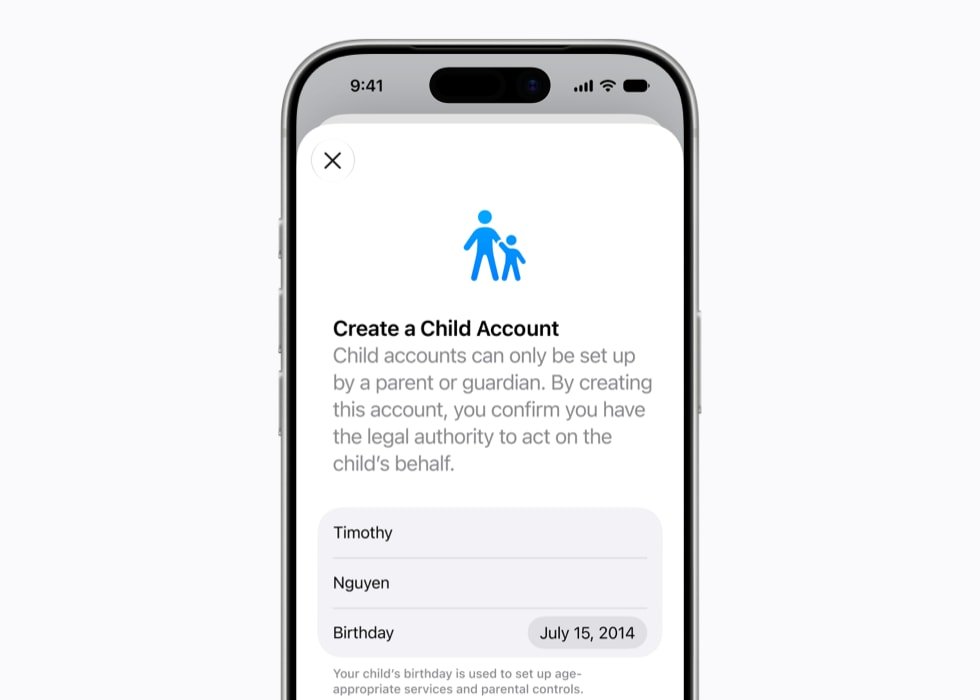
For parents, this is more granular than a simple screen-time limit. For developers, it points toward age-aware app experiences and stronger expectations around younger users. For schools and family-managed devices, this could become one of the most operationally important parts of the 2026 software cycle.
Health, Maps, AirPods, and Apple Watch got useful side features
Apple’s iOS 27 page lists perimenopause and menopause support in Cycle Tracking, with notifications when logged cycle patterns are suggestive of perimenopause and educational resources inside Health. Maps Flyover gets sharper visuals using aerial imagery and Visual Intelligence models. AirPods get Custom EQ. watchOS 27 adds details like custom Wallet passes for memberships or cards with QR codes or barcodes, faster Music playback, step-count sync improvements, battery-optimization suggestions, and Call Context that can surface relevant information while calling a business.
Those are exactly the kinds of features that get buried after a giant Siri AI segment. But they matter because they solve real, narrow problems. A better Wallet pass flow means fewer random membership apps. Call Context means fewer “where is that confirmation code?” moments. Health cycle updates matter to people Apple has historically underserved. Maps Flyover is a visual detail, but it also shows how Apple is applying vision intelligence outside the AI demo lane.
The better version of this post: what Apple skipped, and what Apple buried
So yes, Apple did not announce new hardware or give every AI-policy detail at WWDC 2026. But the stronger read is that Apple also buried a lot of everyday functionality under the bigger AI story. The useful reader takeaway is both halves: know what Apple did not answer, and know which smaller iOS 27 and platform features are actually worth trying when the betas are stable enough.
Apple Did Not Announce New Hardware
The cleanest omission is hardware. Apple’s main WWDC26 announcement is a software release. It covers Apple Intelligence, Siri AI, parental controls, iOS, iPadOS, macOS, watchOS, visionOS, tvOS, search, Photos, Maps, AirPods, App Store tools, and related platform changes. It does not announce a new Mac, iPad, Apple Watch, Vision product, HomePod, Apple TV, AirPods model, foldable device, or new phone hardware line.
That is not shocking. WWDC is usually the place where Apple previews the software that will ship later in the year, not the place where every hardware rumor gets answered. But it is still important because pre-event conversation around Apple tends to pull every rumor into the same bucket: foldables, smart home displays, M-series Macs, Apple TV, HomePod updates, Vision hardware, and future phone lineups. WWDC 2026 did not become that event.
The practical takeaway is simple: do not make a purchase decision because of a hardware announcement Apple did not make. If you were waiting for a new Mac or a new home product, WWDC gave you software context, not a buy-now signal. Creators and agencies should keep planning hardware around current production needs, not around a WWDC hardware reveal that never happened.
For Nitro readers, the useful angle is workflow, not gadget gossip. Better Siri, better Photos search, better visual understanding, and full-resolution iCloud Shared Albums may affect how teams handle content. But camera bodies, edit machines, audio gear, and field kits still need to be evaluated on their own timelines. The same logic applies to the creator-gear side of the site, including our guides on video retention benchmarks and photos versus videos for social media engagement: tools matter when they improve output, not just because a keynote mentioned them.
Apple Did Not Give Final Public Release Dates
Apple gave broad availability windows, not exact public release dates. The official WWDC recap says the new features are available for testing through the Apple Developer Program starting now, a public beta arrives through the Apple Beta Software Program next month, and the free software updates arrive this fall.
That is enough for a normal consumer headline, but it is not enough for operational planning. IT teams still need exact release candidates, app compatibility testing windows, MDM behavior, device-enrollment checks, accessibility validation, and user-education materials. Creators still need to know when features are stable enough for client work. Developers still need to know when App Actions, Siri AI hooks, App Store changes, and child-safety APIs are actually safe to build around.
The same goes for small businesses. A fall release window is useful, but it does not tell you when to update the company phones, whether your field staff should wait, or when to train your team on new Siri and search behavior. The right move is boring and correct: test betas on non-primary hardware, document app issues, and keep production devices stable until the release path is clearer.
Siri AI Still Has a Rollout Gap
Apple did announce Siri AI, and it is the single most important software story of WWDC 2026. But the missing details are where the business risk lives. Apple says new Siri AI features are available for developer testing across iOS 27, iPadOS 27, macOS 27, and visionOS 27, with a future watchOS 27 beta coming later. Apple also says Siri AI will be available as a beta later this year for supported devices set to English, with more languages to follow.
That phrasing matters. It means Siri AI is not simply ‘available everywhere this fall’ in the way a casual headline might imply. It is tied to beta status, supported devices, supported languages, and regional constraints. Apple also says Siri AI will not initially be available in the EU on iOS and iPadOS, and that Siri AI plus the new Apple Intelligence features will not be available in China while Apple works through regulatory requirements.
For users, that means patience. For businesses, it means no one should promise a workflow that depends on Siri AI working for every employee, every client, or every region on day one. For developers, it means App Actions and Siri integrations need fallback paths. For marketers, it means any ‘Siri can now do X’ messaging should be tested against real availability, not keynote excitement.
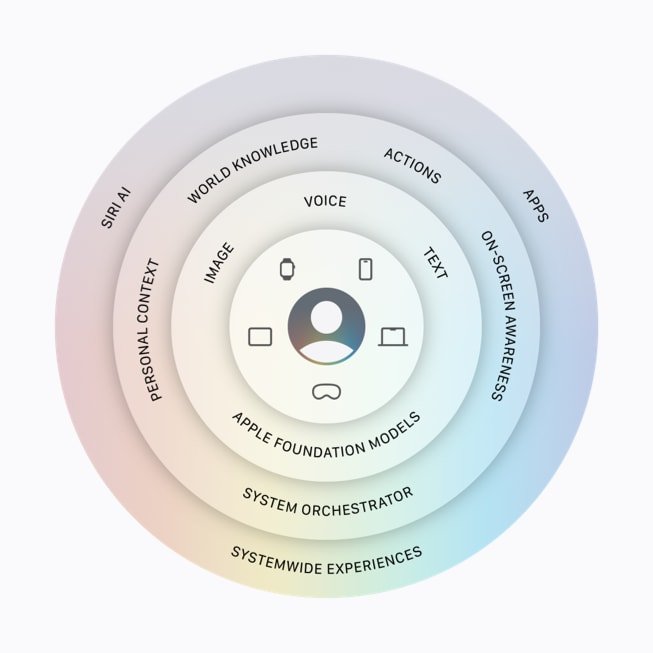
Apple Did Not Fully Explain the Google/Gemini Relationship in Its Main Written Recap
This is one of the trickiest WWDC 2026 gaps because Apple did mention Google/Gemini live. MacRumors’ live transcript captured Apple saying it had embarked on a deep collaboration with Google and leveraged technologies behind Google’s Gemini family of models to create the next generation of Apple Foundation models. TechCrunch also framed Siri AI as having Google Gemini under the hood.
But Apple’s main written WWDC recap does not foreground Google, Gemini, OpenAI, ChatGPT, or another named provider. That does not erase the live statement. It does mean the written consumer-facing story is still Apple-first: Apple Foundation models, on-device processing, Private Cloud Compute, personal context, and integrated Apple Intelligence experiences.
That leaves important questions for anyone using Apple devices in professional workflows. Which parts of the experience use Apple’s models? Which parts use technology from Google’s Gemini family? What telemetry, retention, logging, or prompt-handling rules apply? How will admins, regulated businesses, schools, or agencies explain the provider chain to clients? Where exactly does Private Cloud Compute begin and end for each feature?
Those are not anti-Apple questions. They are procurement and trust questions. If a creator uses Apple Intelligence to prepare client-facing copy, search through sensitive material, or generate a visual concept, the team needs to know what system touched the content. If a developer exposes App Actions, the team needs to know how Apple reviews those actions and what data can pass through them. The keynote gave direction. It did not give every operational answer.
Apple Did Not Publish Exact AI Usage Quotas or Pricing
Apple did disclose that some Apple Intelligence features, including image generation, have daily usage limits because they rely on powerful server models. Apple also said increased access is available with most iCloud+ subscription plans, which also include Apple Intelligence support for compatible Home cameras.
That is useful, but it is not enough for planning. The main recap does not spell out exact daily quotas, feature-by-feature limits, iCloud+ tier differences, what happens when a user hits a limit, or whether business and education accounts will get different controls. For casual users, that may be fine. For production teams, it is a real gap.
Creators and marketers should be especially careful here. If image generation, visual editing, or server-powered intelligence is capped, then it should be treated as a helpful assistant, not a guaranteed daily production system. A small business should not design a same-day social workflow that depends on undefined AI capacity. An agency should not promise a client unlimited Apple Intelligence output without knowing the quota rules.
This also matters for cost. Apple did not turn WWDC 2026 into a pricing presentation, but the mention of iCloud+ means the business model deserves attention. If core Apple Intelligence capacity is tied to subscription tiers over time, that changes how users think about Apple services, storage, cameras, and device value.
Apple Did Not Resolve the EU, China, and Regulatory Story
Apple did mention availability limits, but it did not resolve them. The official materials say Siri AI will not initially be available in the EU on iOS and iPadOS. Apple’s separate EU page connects the delay to the Digital Markets Act and says Apple was not able to ship Siri AI in the European Union with iOS 27 and iPadOS 27 because regulators did not accept its proposed solutions while safely supporting other virtual assistants. Apple also says Siri AI and the new Apple Intelligence features will not be available in China while it works through regulatory requirements.
That is not a footnote. It is a major rollout condition. Apple is trying to build AI directly into the operating system, but operating-system-level AI immediately touches competition policy, privacy law, assistant choice, platform control, and national AI regulation.
For global teams, the practical implication is unevenness. An Apple Intelligence demo shown in California may not match what a user sees in Paris, Berlin, Shanghai, or another regulated market. Developers with global audiences should document regional behavior. Marketers should avoid blanket claims. IT teams should test features with the actual region, language, account, and device configuration their users have.
Apple Did Not Turn App Store Updates Into an App Store Policy Reset
Apple did announce developer-facing App Store changes. The official App Store release talks about creative asset management, product-page tools, subscriptions, bundles, suites, group purchases, TestFlight improvements, and other ways for developers to grow and reach users. Those are useful updates, especially for software teams trying to package and market apps more effectively.
But WWDC 2026 was not a broad reset of App Store economics, fee structures, sideloading, third-party payment policy, third-party assistant policy, or DMA compliance. The App Store business conversation is still bigger than the WWDC feature list.
For developers, that means the new tools are worth studying, but they do not remove the need to watch policy. App Actions and Apple Intelligence may make apps more visible inside system workflows, while App Store changes may improve packaging and discovery. That is product opportunity. It is not the same as a complete business-policy answer.
Apple Did Not Fully Explain the Device Feature Matrix
Apple gave supported-device language, but the feature matrix is still going to matter. The official recap lists supported Apple Intelligence products and says feature availability may vary by region, language, and device. The Siri AI page also points to a second, more powerful on-device model that requires newer Apple silicon and memory thresholds, while Tom’s Guide highlighted that Apple’s most powerful on-device Apple Intelligence model is not universal across the entire supported-device base.
That creates a familiar Apple software story: the operating system may run broadly, while the headline features are more selective. An older supported device may get iOS 27 but not the most advanced Apple Intelligence behavior. A Mac may receive macOS Golden Gate but not every local model capability. A watch feature may require a nearby supported phone. The keynote did not turn all of that into a clean one-page decision tree for regular buyers.
For small businesses and families, this is the upgrade question. You may not need new hardware just to run the next OS, but you might need newer hardware to get the AI feature you actually care about. That is why the next practical step is not pre-ordering anything. It is checking the official compatibility pages and matching features to real needs.
Apple Did Not Make Tim Cook’s Final WWDC the Main Story
There was also a leadership story sitting in the background. Apple announced in April that Tim Cook will become executive chairman of Apple’s board and that John Ternus, senior vice president of Hardware Engineering, will become Apple’s next CEO effective September 1, 2026. TechCrunch described WWDC 2026 as Cook’s last with the company before that handoff.
Apple did not make the keynote a succession ceremony. It did not spend the main WWDC narrative on a giant farewell reel, a John Ternus product manifesto, or a public explanation of how Apple’s next CEO will change the company’s AI, hardware, services, or developer strategy. The software stayed in front.
That restraint is probably intentional. Apple’s message was continuity. Cook can close the WWDC era by showing platform direction, while Ternus inherits a product roadmap that now has to connect hardware, Apple Intelligence, Siri, privacy, developer tooling, and regulatory pressure. Still, this is one of the biggest unspoken stories of the keynote. If WWDC is about the future of Apple’s platforms, then WWDC 2026 also sits at the edge of Apple’s next leadership era.
What Creators and Marketers Should Watch Next
The most important missing details for creators are practical ones. How reliable is Visual Intelligence when the subject is a real location, not a staged demo? Can Siri AI help organize, search, and move visual assets without making mistakes? How much image generation is included before daily limits kick in? Can Apple Intelligence help draft content without flattening a brand voice? How much of this works on the hardware creators already own?
Those questions tie directly into broader creator workflows. Nitro has been tracking how AI video and platform changes affect production, including the shift in AI video tools like Sora. Apple’s angle is different because it is not asking creators to open a separate AI product first. It is trying to put assistance inside the device layer where the content already lives.
That could be powerful, but it also raises the standard for process. Teams should label files clearly, keep client assets organized, use shared albums carefully, preserve originals, and review AI-assisted output before it leaves the building. The more AI becomes invisible, the more human review matters.
Marketers should also watch how Apple’s platform-level AI changes search behavior. If users can ask Siri or Spotlight to find, summarize, or act on content, then clean metadata, useful page titles, descriptive alt text, structured content, and strong source pages become more valuable. The work that helps people understand content also helps assistants understand it.
What Small Businesses, Developers, and IT Teams Should Watch
Small businesses
Small businesses should treat WWDC 2026 as a planning signal. Better search, smarter Siri, improved Messages behavior, and Apple Intelligence could reduce small frictions across customer communication, notes, files, photos, and follow-up. But undefined availability, AI quotas, and device limits mean the safe path is phased adoption, not immediate dependency.
Developers
Developers should read the App Store, App Actions, Foundation Models, child-safety, and Siri documentation as it lands. The big opportunity is making apps useful inside system-level workflows. The big risk is exposing actions without enough guardrails, user confirmation, or privacy clarity.
IT teams
IT teams should map supported devices, supported regions, language settings, Apple IDs, iCloud+ plans, MDM restrictions, app dependencies, and employee roles. The question is not simply ‘Can this device run the update?’ The question is ‘Which features are available to which users, and what happens when they are not?’
Bottom Line
WWDC 2026 was a software-heavy keynote with a very clear message: Apple wants AI to become part of the operating system, not just another app. But the most important unanswered questions are exactly the questions that decide whether that vision is ready for real work: hardware timing, release dates, Siri AI availability, provider transparency, usage limits, App Store policy, regulatory rollout, and device-by-device support.
That does not make the keynote weak. It makes the next few months important. Apple gave users a roadmap. Now developers, creators, small businesses, IT teams, and everyday Apple users need the release notes, beta behavior, compatibility details, and real-world testing that tell us which parts of that roadmap are ready to depend on.
Sources
This article uses Apple’s official Newsroom pages first, then reputable tech coverage for live-keynote context and details Apple did not fully expand in the main written recap.
- Apple Newsroom: WWDC26 software recap
- Apple Newsroom: Siri AI
- Apple Newsroom: Siri AI delayed in the EU on iOS and iPadOS
- Apple Newsroom: App Store capabilities for developers
- Apple Newsroom: Tim Cook and John Ternus CEO transition
- MacRumors: WWDC 2026 live coverage
- TechCrunch: WWDC 2026 roundup
- Tom’s Guide: device limits for Apple’s most powerful on-device model
- Apple iOS 27 preview
- Apple iPadOS 27 preview
- Apple macOS 27 Golden Gate preview
- Apple watchOS 27 preview
Editorial note: All images used in this article are official Apple Newsroom images already uploaded to Nitro Media Group’s WordPress media library. No generated WWDC images are used.


