 Skip to content
Updated after the WWDC 2026 keynote: June 8, 2026 at 3:20 PM CDT. This recap now leads with Apple’s official Newsroom, Developer, Events, and platform materials, with reputable tech coverage used only as supporting context where Apple has not published a fuller written explanation yet.
Apple’s WWDC 2026 keynote wrapped with a broad software year: Apple Intelligence and Siri AI, iOS 27, macOS Golden Gate, Liquid Glass refinements, new search infrastructure, child-safety upgrades, Photos sharing changes, Vision Pro updates, Apple Watch and AirPods improvements, App Store developer changes, and a clearer push toward AI that lives inside the operating system instead of sitting beside it.
The easiest way to understand the keynote is this: Apple is trying to make its devices feel more capable without making users manage a pile of separate AI tools. Siri is becoming more contextual. Visual Intelligence is moving into the Camera app. Search is being rebuilt across iPhone, iPad, and Mac. Family controls are becoming more specific. Developers are getting new surfaces that could make apps more visible inside system-level actions.
For regular Apple users, the practical story is better everyday utility. For creators and marketers, the story is content understanding, photo workflows, shared albums, and AI-assisted communication. For small businesses and IT teams, it is a year to watch device support, beta timing, child-safety controls, search reliability, and whether the new Siri can reduce repetitive device work.
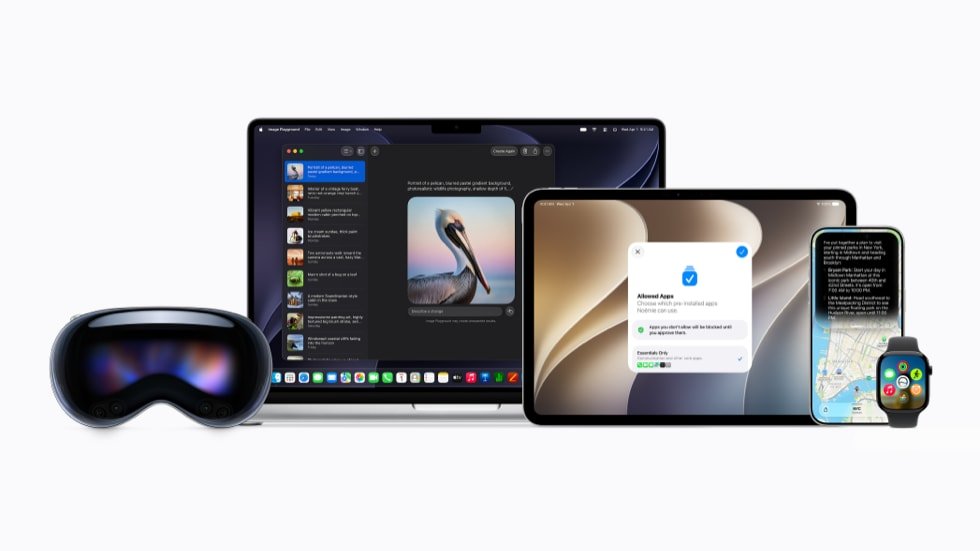
Official Apple Images From WWDC 2026
Apple posted official Newsroom visuals for the WWDC 2026 software announcements. We moved them up here so the recap is not just text-first: these are Apple-sourced images for Siri AI, Visual Intelligence, Shared Albums, visionOS spatial scenes, and child-safety updates.
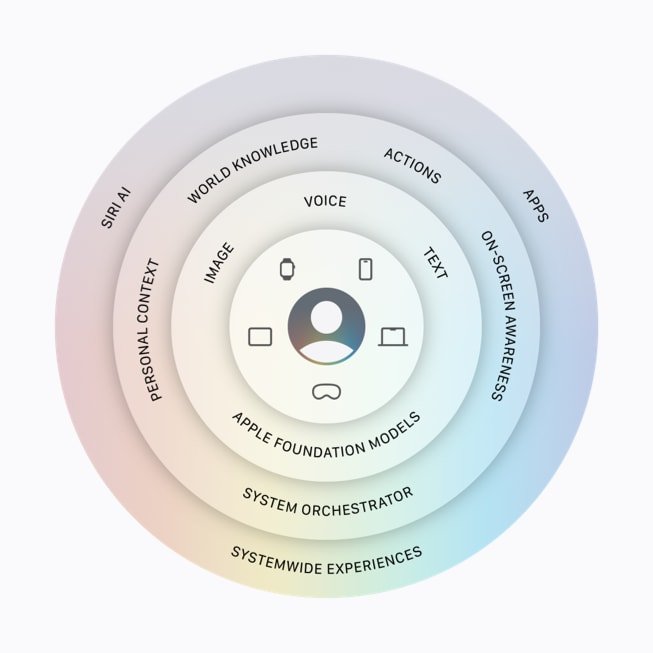
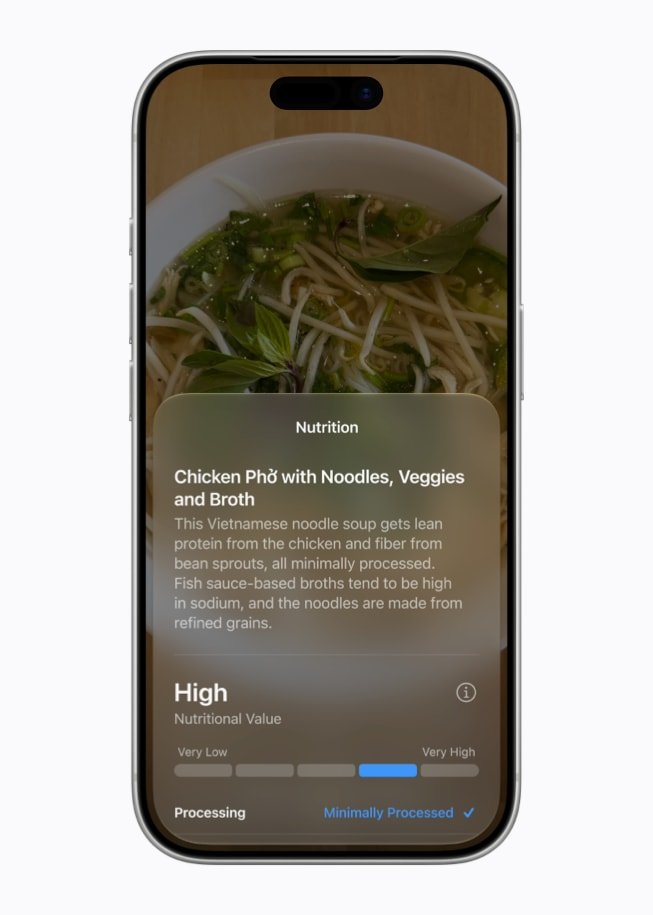
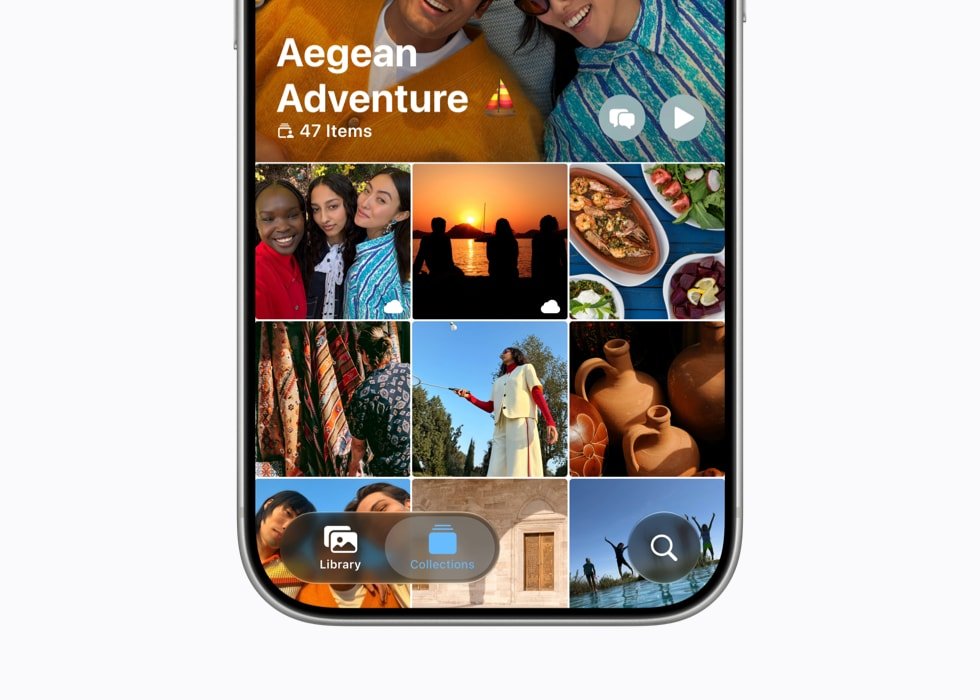

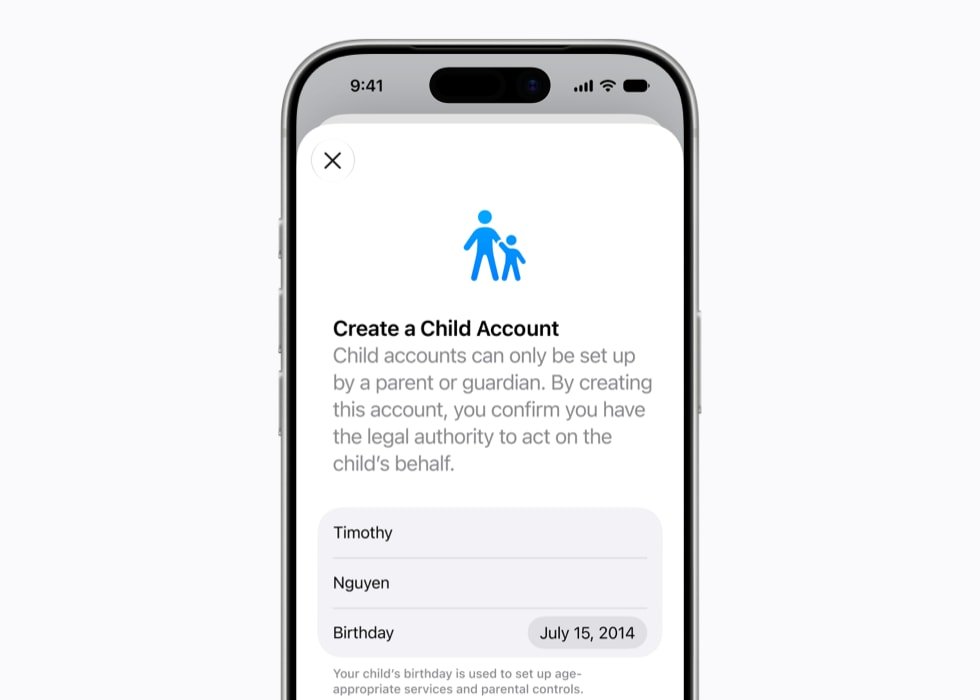
All images in this gallery are official Apple Newsroom images uploaded to Nitro Media Group with descriptive alt text and Apple source captions.
WWDC 2026 at a Glance
Verified WWDC 2026 Announcement Matrix
Editorial note: this recap separates Apple-confirmed platform announcements from business/context analysis. Apple confirmed the platform updates below through Apple Newsroom and Apple OS pages; leadership-transition commentary should be treated as reported context unless Apple publishes a formal succession note.
| Announcement lane | Verified source | Why it matters for creators/businesses |
|---|---|---|
| Siri AI | Apple Newsroom | Apple positioned Siri AI as a more conversational, personal assistant powered by Apple Intelligence. |
| Apple Intelligence platform expansion | Apple Newsroom | AI features extend across iOS 27, iPadOS 27, macOS 27, watchOS 27, and visionOS 27 for supported products. |
| macOS Golden Gate | Apple macOS page | Mac updates affect creators, editors, developers, and business users who rely on Apple Silicon workflows. |
| Child safety updates | Apple Newsroom | Important for family devices, schools, youth-focused brands, and IT teams managing child accounts. |
| Developer tools | Apple Newsroom | Xcode and intelligence-framework changes matter for app teams, automation, and agent-assisted development. |
| Announcement | What Apple announced | Who should care |
|---|---|---|
| Apple Intelligence and Siri AI | Apple says the next generation of Apple Intelligence powers a more capable Siri with personal context, onscreen awareness, App Actions, and Private Cloud Compute. | Apple users, creators, developers, productivity teams |
| iOS 27 | Apple says iOS 27 supports the same iPhone models as iOS 26, including iPhone 11 and later, and adds performance, networking, Messages, Camera, and family-safety updates. | iPhone owners, families, IT teams |
| macOS Golden Gate | Apple’s next Mac release brings the broader 2026 platform changes to Mac, including Apple Intelligence, Search, Liquid Glass refinements, and performance work. | Mac users, agencies, small businesses |
| Search | Apple says it rebuilt search across iOS, iPadOS, and macOS so Spotlight, Photos, and Mail can index old and new content more reliably. | Anyone with large photo libraries, inboxes, or project archives |
| Liquid Glass | Apple is refining the interface system with a transparency slider, layered icons, and platform polish after feedback. | Designers, app teams, everyday users |
| Photos and sharing | iCloud Shared Albums can include Android and Windows contributors and support full-resolution sharing. | Families, event teams, clients, creators |
| Child safety | Apple announced Child Account improvements, Ask to Browse, contact approvals, Time Allowances, Schedules, Screen Time redesigns, and developer APIs. | Parents, schools, developers, family app teams |
| Developer and App Store updates | Apple announced new App Store capabilities, TestFlight improvements, app bundles and suites, asset libraries, and Apple silicon requirements for new Mac App Store submissions. | Developers, software companies, product teams |
A Possible Turning Point: Tim Cook’s Last WWDC as CEO
What Is Confirmed vs What Is Analysis?
| Claim type | How to read it | Editorial treatment |
|---|---|---|
| Apple platform announcements | Siri AI, Apple Intelligence, macOS Golden Gate, child safety, and developer tools have Apple source pages. | Treat as confirmed Apple platform news. |
| Release timing | Apple says supported users get access in the fall for the named OS updates, with beta/developer timing varying by platform and region. | Keep language tied to Apple’s availability wording. |
| Tim Cook succession angle | Widely reported context, but not the main platform announcement. | Frame as reported context/analysis, not as the reason the software matters. |
| Business impact | Nitro analysis based on how creators, marketers, small businesses, developers, and IT teams use Apple platforms. | Useful analysis, not an Apple claim. |
There is another layer to WWDC 2026 that is bigger than any single iOS feature: this was likely Tim Cook’s final WWDC keynote as Apple’s CEO. In April, Apple announced that Cook will become executive chairman of Apple’s board and that John Ternus, Apple’s senior vice president of Hardware Engineering, will become Apple’s next chief executive officer effective September 1, 2026.
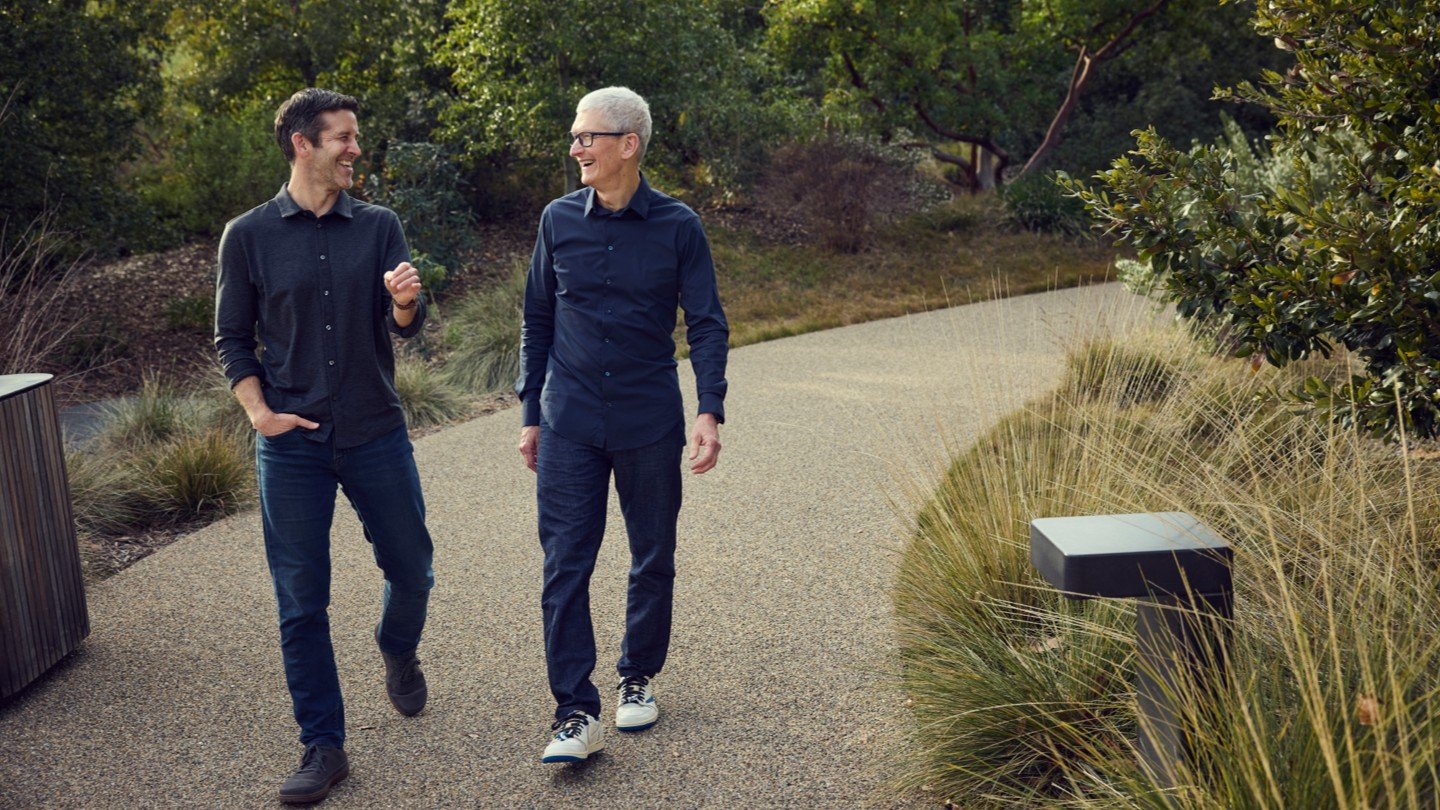
That makes this keynote feel like a transition document. Cook’s Apple has been defined by operational discipline, services growth, Apple silicon, wearables, privacy positioning, and ecosystem scale. WWDC 2026 put the company in a different kind of spotlight: Apple now has to prove that its AI strategy can feel as integrated and dependable as the rest of its platform story.
Ternus is a hardware leader, which is important context. If he becomes CEO on Apple’s announced timeline, the next era of Apple may be judged by how tightly it connects devices, silicon, services, software, and AI. The WWDC 2026 announcements point in that direction: Siri AI, Private Cloud Compute, Visual Intelligence in Camera, App Actions, Vision Pro spatial updates, and platform-wide search all depend on Apple making hardware and software feel like one system.
For creators, marketers, developers, and small businesses, the leadership transition is worth watching because it may shape Apple’s priorities. A Ternus-led Apple could keep leaning into the company’s hardware advantage while trying to make AI feel native to iPhone, Mac, iPad, Watch, Vision Pro, and AirPods. The strategic question is not whether Apple can announce AI features. It is whether Apple can make them useful enough that people trust them in daily workflows.
So yes, WWDC 2026 may be remembered not only as the Siri AI and iOS 27 keynote, but also as the last major developer keynote of the Tim Cook CEO era. That does not mean Cook disappears from Apple; Apple’s own announcement says he moves to executive chairman. But it does mean the next WWDC may arrive with a new CEO on stage and a different burden of proof around Apple’s AI future.
Apple Intelligence Becomes the Center of the Platform Story
Apple made Apple Intelligence the centerpiece of WWDC 2026, but it did not frame the update as a chatbot launch. The company described a system-level intelligence layer that can use personal context, understand what is on screen, work through app actions, and move between device-based processing and Private Cloud Compute when a more capable model is needed.
That matters because Apple’s advantage has never been simply owning one feature. Its advantage is integration. If Apple Intelligence can understand the user’s content, device state, apps, and intent while staying inside the privacy model Apple keeps emphasizing, the user experience can feel less like opening an AI product and more like asking the device to help with the thing already in front of you.
Apple’s official materials describe Apple Intelligence as deeply integrated across Apple platforms and designed around personal context. That is the promise. The real test will come in the beta period, when users can see whether the system is fast, reliable, and specific enough to trust with everyday work.
Apple’s main Newsroom recap adds a few concrete examples. Siri AI includes a dedicated Siri app where users can revisit previous conversations or start a new one, with iCloud privately syncing conversation history across Apple products. Apple also says Siri AI can use personal context to search messages, email, photos, and more; answer questions about the content on screen; use broader web knowledge when needed; and complete more systemwide app actions.
The wider Apple Intelligence feature set now includes Spatial Reframing in Photos for improving a photo’s composition after capture, photorealistic-style image creation in Image Playground, Safari’s Notify Me feature for monitoring web pages for changes like restocks or price drops, and Messages one-tap suggestions for actions like creating a reminder or note from conversation context.
The creator implication is immediate. A system that can understand images, edit photos, create visuals, summarize context, and search personal libraries could become useful in the unglamorous parts of creative work: finding assets, preparing reference material, cleaning up drafts, grouping photos, turning notes into action items, and moving content between apps.
Siri AI Is the Biggest Functional Reset
Apple says Siri AI is a more capable and personal assistant built around broad world knowledge, personal context, onscreen awareness, and App Actions. That is a much bigger claim than a new voice UI. Apple is describing Siri as a system that can understand what a user is doing and then use the right app tools to help complete the task.
The architecture Apple showed includes personal context, a semantic index, onscreen awareness, App Actions, web information, on-device processing, and Private Cloud Compute. In practice, that could let Siri understand the content currently visible on screen, connect it with what the user has saved or received, and then take action across apps.
The important shift is from command-and-response to context-and-action. A basic assistant can set a timer. A useful system assistant should be able to understand a message, find a related file, draft a reply, attach the right image, and ask for confirmation before sending. Apple is not proving all of that on day one, but WWDC 2026 is the clearest statement yet that this is where Siri is headed.
The dedicated Siri app is a meaningful product signal because it turns Siri from a purely transient voice layer into a place where users can return to prior assistant work. For businesses and creators, that could matter if Apple Intelligence becomes a searchable, reusable context trail instead of a one-off prompt window.
For developers, App Actions are the piece to watch. If developers can expose useful actions safely and predictably, apps may become part of Siri workflows without forcing the user to open each app manually. For marketers and small businesses, that could eventually affect CRM notes, email drafting, meeting prep, lead follow-up, asset lookup, and task handoff.
Visual Intelligence Moves Into the Camera
One of the most concrete Apple Intelligence updates is Visual Intelligence inside the Camera app. Apple’s official WWDC materials show Siri mode in Camera identifying what is in front of the user and surfacing useful follow-up information. Apple’s example includes nutritional insights from a food photo, but the broader concept is more important than the demo.
Camera-based AI turns the real world into an input source. Users can point at an object, document, product, sign, meal, place, or scene and ask for context. For a consumer, that could mean quick information. For a small business owner, it could mean logging a product display, reading a sign, saving a receipt, documenting a service call, or starting a note from a real-world scene.
Creators should treat this as a camera workflow update, not just an AI update. If Visual Intelligence becomes reliable, it can help with location scouting, identifying references, pulling context from physical materials, or turning what is in front of the camera into the start of a production note. The key will be how quickly the system moves from recognition to useful action.
iOS 27 Keeps Older iPhones in the Mix
Apple says iOS 27 supports the same iPhone models as iOS 26, including iPhone 11 and later. That is a practical win for families, small businesses, schools, and IT teams that were hoping to keep existing devices running for another cycle.
WWDC 2026 also emphasized performance and system behavior, and Apple’s official recap puts numbers behind that story. Apple says iPhone and iPad apps launch up to 30 percent faster, photos load up to 70 percent faster after being taken, AirDrop transfers are up to 80 percent faster, and browsing or transferring files between external drives and iPad is up to 5x faster. As always, those claims need beta and real-world testing, but they make the performance angle more concrete than a vague polish year.
The Wi-Fi and cellular handoff work is another everyday example. A smarter iPhone should know when a known Wi-Fi network is weak enough that cellular is better. That kind of invisible polish matters because it removes friction without asking the user to manage the device.
Messages also gets low-bandwidth improvements. Apple’s keynote described clearer delivery state when large photos or videos are being sent in poor network conditions. Again, this is not a flashy headline, but it is the sort of fix that people notice only because it stops annoying them.
macOS Golden Gate and Liquid Glass Refinements
macOS Golden Gate is Apple’s next Mac release, and it inherits the bigger 2026 platform themes: Apple Intelligence, Siri AI, search improvements, Liquid Glass refinement, and performance work. For Mac users, this looks less like a single-feature year and more like a stability, intelligence, and polish release.
That is good news for creative teams and agencies. Macs are production tools. The best software years for production machines are often the ones that make the computer faster, more searchable, easier to manage, and less surprising. If macOS Golden Gate improves Spotlight, Mail, Photos, app behavior, and Apple Intelligence workflows, it could matter more in daily use than a loud visual redesign.
Liquid Glass is also getting a refinement pass. Apple is keeping the design language, but coverage of the keynote points to user-facing control and interface polish, including a transparency slider and more layered treatment. That is a useful sign. Apple is still pushing a glassy, depth-driven interface direction, but it is also responding to readability and comfort concerns.
Designers and app teams should not ignore this. Apps that adopted last year’s visual language aggressively should retest contrast, translucency, sidebar behavior, icon treatment, and readability across iOS, iPadOS, macOS, watchOS, tvOS, and visionOS betas.
Search Gets a Rebuilt Foundation
Apple’s Search update may be one of the most practical announcements in the keynote. The company says search across iOS, iPadOS, and macOS is built on a device-created index of user content, and that the 2026 updates make this index more stable, efficient, and comprehensive.
That search foundation matters because it powers Spotlight, Photos, and Mail. If the new index can handle existing content after the update and index new content almost immediately, users should spend less time hunting through old messages, photos, documents, attachments, and email threads.
For small businesses, this is a productivity feature hiding in plain sight. Better device search can reduce lost time across client files, invoices, meeting notes, project references, event photos, and email history. For Apple Intelligence, it is even more important because personal context only works if the system can actually find and understand the user’s relevant content.
Photos, Shared Albums, Vision Pro, Maps, and AirPods
Beyond Apple Intelligence, WWDC 2026 included a set of useful app and platform updates. Photos gets a significant sharing improvement: iCloud Shared Albums can now include Android and Windows contributors, and Apple says full-resolution sharing is supported. That is a practical change for families, clients, event teams, and anyone who works in mixed-device groups.
For Nitro-style production work, this is the kind of detail that matters. If clients, guests, or collaborators can contribute to Apple photo workflows without being fully inside the Apple ecosystem, photo handoff gets easier. It will not replace professional asset management, but it can reduce friction for casual contribution, event documentation, and family or community media sharing.
Vision Pro also gets a more visual update. Apple says visionOS 27 can convert panoramas into spatial scenes and use them as personal environments. That makes old panoramic shots more useful inside spatial computing, and it gives creators another reason to think about how 2D capture can become immersive context later.
Maps Flyover is also getting sharper visual detail using aerial imagery and vision-intelligence models. Apple called out improved architecture, trees, and reflections. This is a consumer navigation feature on the surface, but it also fits Apple’s broader theme: computer vision is becoming part of the visual fabric of its platforms.
AirPods gain custom EQ, which lets users personalize sound. Apple Watch and tvOS updates round out the ecosystem story with workout, Smart Stack, Siri, TV, and entertainment improvements. None of these secondary updates dominate the keynote, but together they show Apple trying to make its whole device ecosystem feel more coherent.
Child Safety Gets a Major Expansion
Apple’s child-safety announcements deserve their own section because they are some of the most concrete changes from WWDC 2026. Apple announced expanded Child Account controls, a new Setup Assistant, Ask to Buy, Ask to Browse, contact approval tools, Communication Safety updates, Time Allowances, Schedules, a redesigned Screen Time experience, and developer APIs for age-aware experiences.
The Setup Assistant is meant to help parents start with safer defaults. Ask to Browse extends the approval model to websites. Contact approval lets kids ask before connecting with new people. Communication Safety continues to warn and blur sensitive material, and Apple says the system is expanding to intervene before kids see certain violent or graphic content in shared media.
Time Allowances and Schedules make Screen Time more specific. Instead of only thinking about total time, parents can define which kinds of apps are available and when. That is a better match for real family routines, where homework time, school hours, travel, entertainment, and communication may need different rules.
For developers, the Declared Age Range API and child-safety APIs are the pieces to watch. Apple is trying to give apps a way to adjust experiences for children and teens without forcing developers to collect more personal information than necessary. Apps in education, games, social, family communication, creator tools, and AI will need to pay attention.
App Store and Developer Updates
Apple also announced App Store and developer-facing changes that could affect how software teams package, test, market, and submit apps. Official Apple materials describe new ways to manage creative assets in Product Pages, an Asset Library, more personalized App Store collections, app bundles and suites, group purchase discounts, and improvements to TestFlight.
The Mac App Store change is especially important: Apple says new Mac App Store apps and updates must support Apple silicon rather than Intel Macs. That is a clear line in the sand for Mac software going forward.
For developers and product marketers, the App Store updates matter because the store is still one of Apple’s most important discovery and conversion surfaces. Better creative asset management and bundles can help teams present products more clearly, but App Review and privacy metadata still need to be clean. Apple’s official post also says it is tightening expectations around in-app purchases, screenshots, and privacy information.
For small businesses using custom or niche apps, the practical takeaway is to check whether key Mac software depends on older Intel support. For software companies, the takeaway is sharper: Apple silicon is now the platform direction, and marketing assets, testing, and app packaging need to match that future.
Availability and Beta Timing
Apple says developer testing for the 2026 software updates is available now through the Apple Developer Program, with public betas coming next month through the Apple Beta Software Program and free software updates planned for the fall. Most everyday users should wait for public release or at least public beta. Developers, IT teams, and power users should test on non-primary devices first.
Apple says users who enable Apple Intelligence on supported products set to a supported language will have access this fall with iOS 27, iPadOS 27, macOS 27, watchOS 27, and visionOS 27. Apple lists support for English, Danish, Dutch, French, German, Italian, Norwegian, Portuguese, Spanish, Swedish, Turkish, Vietnamese, Simplified Chinese, Traditional Chinese, Japanese, and Korean, while also noting that some features may not be available in every region or language.
The supported-device list is narrower than the iOS 27 compatibility list. Apple says Apple Intelligence and Siri AI are available on iPhone 16 models or later, iPhone 15 Pro, iPhone 15 Pro Max, iPad mini with A17 Pro, iPad models with M1 or later, Mac with M1 or later, Apple Vision Pro, Apple Watch Series 10 or later, Apple Watch Ultra 2 or later, and Apple Watch SE 3 when paired with an Apple Intelligence-enabled iPhone nearby.
Apple also added practical limitations that users should know before installing a beta. Some Apple Intelligence features, including image generation, have daily usage limits because they rely on powerful server models; Apple says increased access is available with most iCloud+ subscription plans. New Siri AI features are available for developer testing today across iOS 27, iPadOS 27, macOS 27, and visionOS 27, with watchOS 27 testing coming in a future beta. Siri AI is expected as a beta later this year for supported devices set to English, with more languages to follow.
Regional availability is also important. Apple says Mac, Apple Watch, and Apple Vision Pro users in the EU will be able to access Siri AI when set to a supported language, but Siri AI will not be available initially in the EU on iOS and iPadOS. Apple also says Siri AI and the other new Apple Intelligence features will not be available in China while it works through regulatory requirements.
For IT teams, the next step is not to install everything everywhere. The next step is to make an inventory: supported devices, Apple Intelligence-capable devices, critical apps, MDM policies, child-safety settings, accessibility requirements, beta testing devices, and user groups that would benefit from early testing. For creators and marketers, the next step is to identify workflows that could benefit from Apple Intelligence without putting client work at risk.
What This Means for Creators, Marketers, Small Businesses, Developers, and IT
WWDC 2026 Action Checklist
| Team | What to test first | Why |
|---|---|---|
| Creators | Siri AI, Photos, Visual Intelligence, AirPods/audio workflows, and device compatibility. | AI features are useful only if they speed up editing, planning, capture, or publishing. |
| Marketers | Safari/search changes, Apple Intelligence content tools, and privacy-sensitive personalization. | Apple platform behavior can change campaign measurement, landing-page behavior, and creative workflows. |
| Small businesses | Supported-device list, EU/regional availability, child/family controls, and employee training notes. | The rollout may not affect every device or region equally. |
| Developers | Xcode 27, Apple intelligence frameworks, MCP/agent-tool integration, and beta compatibility. | This is where WWDC moves from keynote to actual product roadmap. |
| IT teams | MDM readiness, beta policy, supported hardware, AI data controls, and user education. | AI features without rollout planning become support tickets with nicer branding. |
Creators
Creators should watch Visual Intelligence, Photos, Shared Albums, Search, and Siri App Actions. If these features mature, they can help with asset discovery, rough image edits, visual references, shoot notes, location context, client sharing, and content organization. They will not replace taste or direction, but they may reduce busywork around creative logistics.
Marketers
Marketers should pay attention to where Apple puts AI inside communication and content workflows. If users draft messages, find assets, inspect visuals, and summarize context inside the operating system, marketing teams need content that is clear, structured, and easy for people and assistants to understand. That includes cleaner naming, better metadata, stronger image alt text, and more useful source pages.
Small businesses
Small businesses should look at the practical features first: older iPhone support, better search, better networking, Messages reliability, child-safety controls, Photos sharing, and Siri actions. The flashy AI pieces are interesting, but the real business benefit may be fewer interruptions and faster access to the right information.
Developers
Developers should start reading Apple’s App Actions, Apple Intelligence, App Store, TestFlight, and child-safety documentation. Apps that expose useful actions cleanly may become more useful inside Siri and Apple Intelligence workflows. Apps that serve children, teens, families, schools, or social use cases need to understand the new age and safety APIs.
IT teams
IT teams should plan a conservative beta cycle. Confirm device support, app compatibility, Apple silicon dependencies, child-safety policy needs, MDM behavior, and user education. iOS 27’s iPhone 11 support gives many teams breathing room, but the Apple Intelligence feature matrix will likely vary across hardware.
WWDC 2026 FAQ
What did Apple announce at WWDC 2026?
Apple announced next-generation Apple Intelligence features, Siri AI, Visual Intelligence in the Camera app, iOS 27, macOS Golden Gate, search infrastructure updates, Liquid Glass refinements, child-safety features, Photos sharing changes, Vision Pro updates, App Store developer changes, and additional platform updates across Apple Watch, AirPods, Maps, and tvOS.
Is iOS 27 dropping iPhone 11?
No. Apple says iOS 27 supports the same iPhone models as iOS 26, including iPhone 11 and later.
What is Siri AI?
Siri AI is Apple’s new assistant architecture that combines personal context, onscreen awareness, App Actions, web information, on-device intelligence, and Private Cloud Compute so Siri can better understand user requests and take relevant actions.
What is macOS Golden Gate?
macOS Golden Gate is Apple’s 2026 Mac software release. It brings the wider WWDC 2026 platform story to Mac, including Apple Intelligence, Siri AI, search improvements, Liquid Glass refinement, and performance-focused updates.
Should I install the developer beta now?
Most people should not install developer betas on primary devices. Developers and IT teams should use test hardware, verify app compatibility, and wait for public beta or fall release for everyday devices.
SEO Metadata and Editorial Notes
SEO title options: WWDC 2026 Recap: Siri AI, Apple Intelligence, iOS 27; WWDC 2026 Recap: Apple’s Biggest Software Announcements; WWDC 2026: Apple Intelligence, iOS 27, macOS Golden Gate, and More.
Meta description: Apple’s WWDC 2026 keynote wrapped with Siri AI, Apple Intelligence, iOS 27, macOS Golden Gate, Liquid Glass, child-safety updates, App Store changes, and more.
Slug: wwdc-2026-recap-apple-intelligence-ios-27-macos-golden-gate.
Internal link suggestions: link this recap from Nitro’s Apple, AI, creator-tech, small-business technology, and production-workflow posts where context fits. Use anchors such as WWDC 2026 recap, Apple Intelligence updates, iOS 27, Siri AI, and Mac software updates.
Social caption: Apple’s WWDC 2026 keynote wrapped with Siri AI, iOS 27, macOS Golden Gate, new child-safety tools, Photos sharing updates, and App Store changes. Here is the broad Nitro recap and what it means for creators, marketers, small businesses, developers, IT teams, and Apple users.
Sources
This recap prioritizes Apple’s official Newsroom, Developer, Events, and platform materials. Secondary sources are included for additional live-event context and details that Apple had not fully expanded in written form at publish time.
- Apple Newsroom: Apple unveils next generation of Apple Intelligence, Siri AI, and more
- Apple Newsroom: Apple introduces Siri AI
- Apple Newsroom: Apple expands child safety features
- Apple Newsroom: App Store capabilities for developers
- Apple Developer: Apple Intelligence
- Apple macOS preview
- Apple Events
- MacRumors: macOS Golden Gate
- MacRumors: Liquid Glass improvements
- MacRumors: Search infrastructure
- 9to5Mac: iOS 27 performance improvements
- TechCrunch: WWDC 2026 roundup
Editorial note: The images in this post are official Apple Newsroom images uploaded to Nitro Media Group’s WordPress media library with source captions. No generated WWDC images are used in this wrapped-keynote pass.


