 Skip to content
2026 refresh: sports production tools should be sorted by job, not by hype. A school gym livestream, a recruiting highlight package, a tournament recap, and a sponsor-ready broadcast are four different tool stacks. Buy for the job in front of you, then scale when the work proves it.
Affiliate disclosure: the product links in this refresh use direct Amazon affiliate links. Prices below are current research checkpoints from Amazon or major retailers where available; verify the live Amazon price, seller, and exact bundle before buying.
Fast Answer: What Tools Matter Most For Sports Video?
For sports video, prioritize stable capture, clean audio, fast switching or tagging, storage discipline, and an edit workflow that can turn games into usable clips quickly. The best tool is not always the fanciest camera. Sometimes it is the thing that keeps you from missing the only touchdown, dunk, goal, or sponsor moment that mattered.
Sports Production Tool Stack
| Production lane | Core tools | What matters most |
|---|---|---|
| Single-operator highlight coverage | Mirrorless or camcorder, monopod, fast cards, long battery, clean lens reach. | Stability, timing, and not panning like you are chasing a fly. |
| Social recap | DJI RS 4 Mini, wireless audio, fast editing, vertical framing plan. | Short hooks, quick turnarounds, crowd/player emotion, and caption-ready clips. |
| Livestream | Blackmagic ATEM Mini Pro ISO or YoloBox Ultra, encoder, network backup, score graphics, comms. | Reliability. The viewer does not care that your setup was creative if the stream dies. |
| Field interviews | DJI Mic 2 or RODE Wireless PRO, small light, clean backdrop, fast release forms. | Audio and speed. Players/coaches are not hanging around while you rebuild the universe. |
| Aerial/context shots | DJI Air 3S Fly More Combo where legal and appropriate, FAA/venue permission, safety plan. | Compliance and restraint. Drone shots are seasoning, not the whole meal. |
Product Watchlist With Price Checkpoints
| Product | Price checkpoint | Best use |
|---|---|---|
| DJI RS 4 Mini | $309 Amazon check | Direct Amazon product page with Nitro affiliate tag. Verify seller, bundle contents, and return window before buying. |
| DJI Mic 2 | $199-$249 retail check | Direct Amazon product page with Nitro affiliate tag. Verify seller, bundle contents, and return window before buying. |
| RODE Wireless PRO | $279 retail check | Direct Amazon product page with Nitro affiliate tag. Verify seller, bundle contents, and return window before buying. |
| Blackmagic ATEM Mini Pro ISO | $495 MSRP / $579 bundle check | Direct Amazon product page with Nitro affiliate tag. Verify seller, bundle contents, and return window before buying. |
| YoloBox Ultra | $1,549 retail check | Direct Amazon product page with Nitro affiliate tag. Verify seller, bundle contents, and return window before buying. |
| DJI Air 3S Fly More Combo | $1,399 Amazon check | Direct Amazon product page with Nitro affiliate tag. Verify seller, bundle contents, and return window before buying. |
Check DJI RS 4 Mini PriceCheck DJI Mic 2 PriceCheck RODE Wireless PRO PriceCheck Blackmagic ATEM Mini Pro ISO PriceCheck YoloBox Ultra PriceCheck DJI Air 3S Fly More Combo Price
Field Workflow That Saves The Edit
- Start with the deliverable. Recruiting clips, sponsor recap, full-game archive, and livestream replay all need different capture decisions.
- Use a shot priority list. Scoreboard, athletes, coaches, crowd, sponsor signage, warmups, key plays, reactions, and detail shots should all have a lane.
- Label media immediately. Game one, game two, team name, date, camera angle, and card number. Future you deserves basic mercy.
- Record room/field audio intentionally. Crowd sound, announcer, coach/player interviews, and nat sound can make highlights feel alive.
- Plan fast exports. Build presets for vertical clips, recruiting reels, sponsor recaps, and archive files instead of inventing delivery settings at midnight.
Related Nitro reads: sports video production companies, live streaming, wireless microphones, camera movement basics, and frame rate choices.
Sources Checked For This Refresh
| Source | Why it matters |
|---|---|
| Blackmagic ATEM Mini | Official switcher family reference for multicamera/live production context. |
| DJI RS 4 Mini specs | Official gimbal spec reference for payload/runtime context. |
| FAA Remote Pilot Certificate | Commercial drone operation context for sports/venue aerial work. |
| Wyzowl 2026 video marketing statistics | Current context for social/business video output. |
You want to find the best sports video production tools for 2026. Sports technology is changing very quickly now. Broadcasters give fans special viewer experiences. AI helps you make content faster and smarter. Remote integration models let you cover more sports events. You do not need to travel as much. Picking the right gear and software depends on your goals. You might coach, play, analyze, or create content. Video analysis helps you train better. It helps you improve sports performance. Sports video production tools help with coaching and athlete feedback. They also help with sports content creation. Sports technology makes your work easier and more fun.
Key Takeaways
-
Pick a camera that matches your skill level. Beginners can use cheaper cameras like the Panasonic Lumix GH5. Professionals may want expensive ones like the Sony A7S III.
-
Use video analysis software to get better at sports. Tools like Hudl and Dartfish help coaches and athletes see what they do well. These tools also show what needs work for better training.
-
Think about where you coach and what you need before picking tools. If you coach inside or outside, make sure your equipment works for those places.
-
Use cloud-based solutions to share and work together easily. Platforms like Hudl let teams watch and talk about footage from anywhere.
-
Try simple tools if you are new to sports video production. When you learn more, use advanced features and software to help your coaching and analysis.
Top Sports Video Production Tools
Leading Cameras for Sports
You want to film every moment in sports. The right camera helps a lot. Some cameras are good for beginners. Others are better for experts. Here are the best cameras for sports in 2026.
| Camera Model | Key Features | Best For |
|---|---|---|
| Sony A7S III | 4K 120fps, 759 Autofocus Points, Excellent Low-Light Performance, Weather Sealing | Professional Sports Videographers |
| Canon EOS R6 | 4K 60fps, Dual Pixel Autofocus II, IBIS, Low-Light Performance, Weather-Sealed | Versatile Sports Videography |
| Panasonic Lumix GH5 | 4K 60fps, 5-Axis In-Body Image Stabilization, Weather-Sealed, Affordable | Budget-Friendly 4K Sports Videography |
| Fujifilm X-H2S | 6.2k/30p, 26.1MP Stacked Sensor, 240fps HD, AI Autofocus, Rugged Build | High-Speed Action and Durability |
These cameras have special features. The Sony A7S III has fast autofocus and high frame rates. You can follow quick action easily. The Canon EOS R6 has strong image stabilization. It works well in low light. The Panasonic Lumix GH5 is good for beginners. It has many features and costs less. The Fujifilm X-H2S has a 26.1-megapixel sensor. It can shoot 240 frames per second in HD. You get slow-motion and a tough camera for outdoor sports.
Tip: For slow-motion replays, pick cameras with high frame rates like 120fps or 240fps.
Beginner vs. Professional Gear
You do not need expensive gear to start. Beginner cameras like the Panasonic Lumix GH5 or your phone work well. These are simple and cost less. Professional cameras like the Sony A7S III or Fujifilm X-H2S have more features. You get better autofocus and higher video quality. These are best for live broadcasts or detailed analysis.
Essential Software for Video Analysis
After filming, you need software to study your footage. Video analysis software helps you find strengths and weaknesses. Coaches, athletes, and analysts use these tools to get better.
Here are the most popular choices in 2026:
-
Hudl: Good for team video analysis and coaching.
-
Dartfish: Used by Olympic teams for reviews.
-
Nacsport: Trusted by coaches for strong features.
-
Pixellot: Uses AI for video capture and analytics.
-
Veo: Lets you record and watch games without a cameraman.
-
PlaySight: Gives video and analytics for many sports.
-
Spiideo: Handles recording, analysis, and live streaming.
-
Kinovea: Open-source and easy for anyone.
-
LongoMatch: Works well for youth and semi-pro teams.
-
Wyscout: Great for opponent analysis and scouting.
Some tools help teams, others help individuals. Hudl and Dartfish give deep analysis and easy sharing. Pixellot and Veo use AI to make video capture simple. Kinovea and LongoMatch are good if you want free or cheap options.
Comparing Beginner and Professional Software
Let’s see how beginner and professional video analysis tools compare:
| Software | Price | User-Friendly | Video Stabilization | Motion Tracking |
|---|---|---|---|---|
| PowerDirector | $69.99/yr | Yes | Yes | Yes |
| Adobe Premiere Pro | $239.88/yr | No | Yes | Yes |
| Final Cut Pro X | $299.99 | No | Yes | Yes |
| iMovie | Free | Yes | Yes | No |
| GoPro Studio | Free | Yes | No | No |
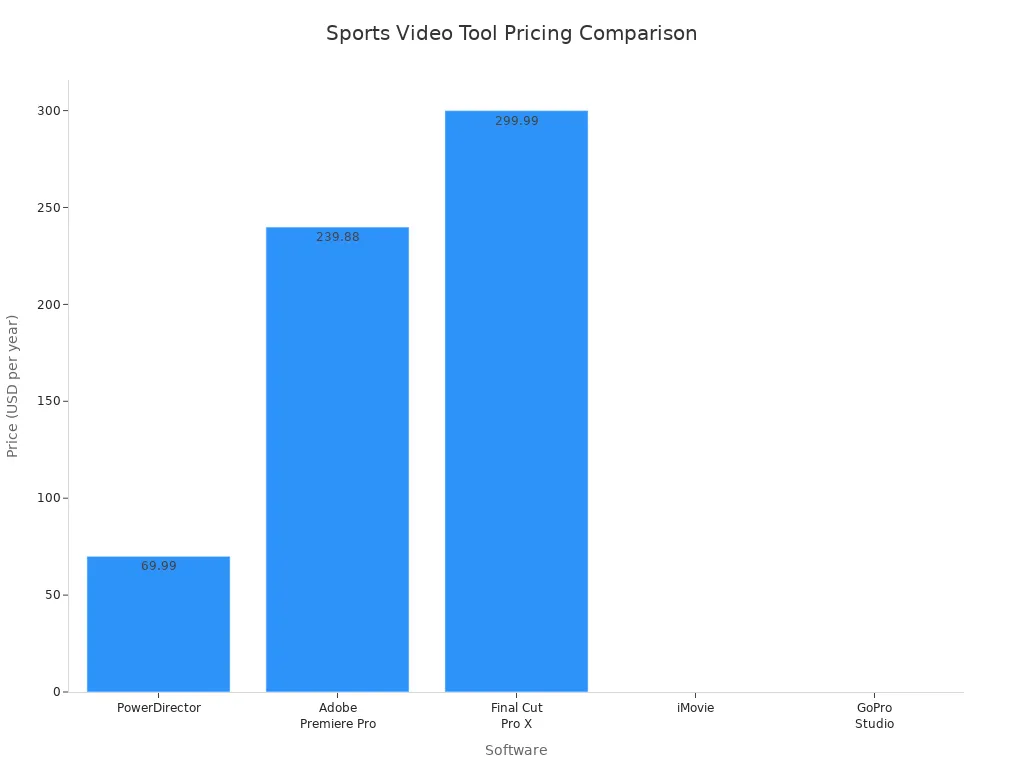
Beginner software like iMovie and GoPro Studio is free and simple. You can edit clips and add basic effects. Professional tools like Adobe Premiere Pro and Final Cut Pro X have more features. These are best for detailed analysis or making highlight reels.
Note: Pick your tools based on your needs. If you coach a youth team, simple software and a budget camera may be enough. If you work with pro athletes, get advanced video analysis software and high-end cameras.
Now you know the top sports video production tools for 2026. The right cameras and software help you film, study, and share every important moment.
What Is Sports Video Production?
Key Concepts and Benefits
You may ask what sports video production is. It is not just recording games or practice. You use cameras and software to catch every moment. Then you look at the action to learn more. This helps you see how athletes move and work together. You can also find ways to get better.
Here are some main benefits of sports video production:
-
You can study player performance in detail. This helps you find what players do well or need to fix.
-
You can learn about team tactics and make better plans. This helps you get ready for the next game.
-
Coaches can give feedback that is easy to understand. Players see what coaches mean right away.
-
Coaches can find new talent more easily. Good video helps with recruiting and scouting.
-
You can help stop injuries and help athletes heal. Watching movements helps with recovery.
Performance analysis helps you make smart choices. Video analysis lets you review plays and compare players. You can track progress and share clips with your team. You can also make highlight reels. Sports video production helps you reach your goals if you coach, play, or analyze.
Impact on Sports Training
Video analysis changes how you practice. You can see mistakes and good plays right away. You can pause, rewind, and watch each move. This helps you practice smarter and play better.
Recent studies show how video analysis helps training:
| Findings | Description |
|---|---|
| Effectiveness | Video-based training helps football referees make better choices. |
| Practicality | It is a useful way to train. |
| Limitations | Studies had few people and not enough girls or women. |
Performance analysis helps you make better choices. Coaches use video analysis for feedback and planning. Athletes watch themselves and learn faster. Sports video production makes training better and helps stop injuries. You get a clear way to improve and get stronger results.
Types of Sport Video Analysis Tools
Mobile Apps vs. Desktop Software
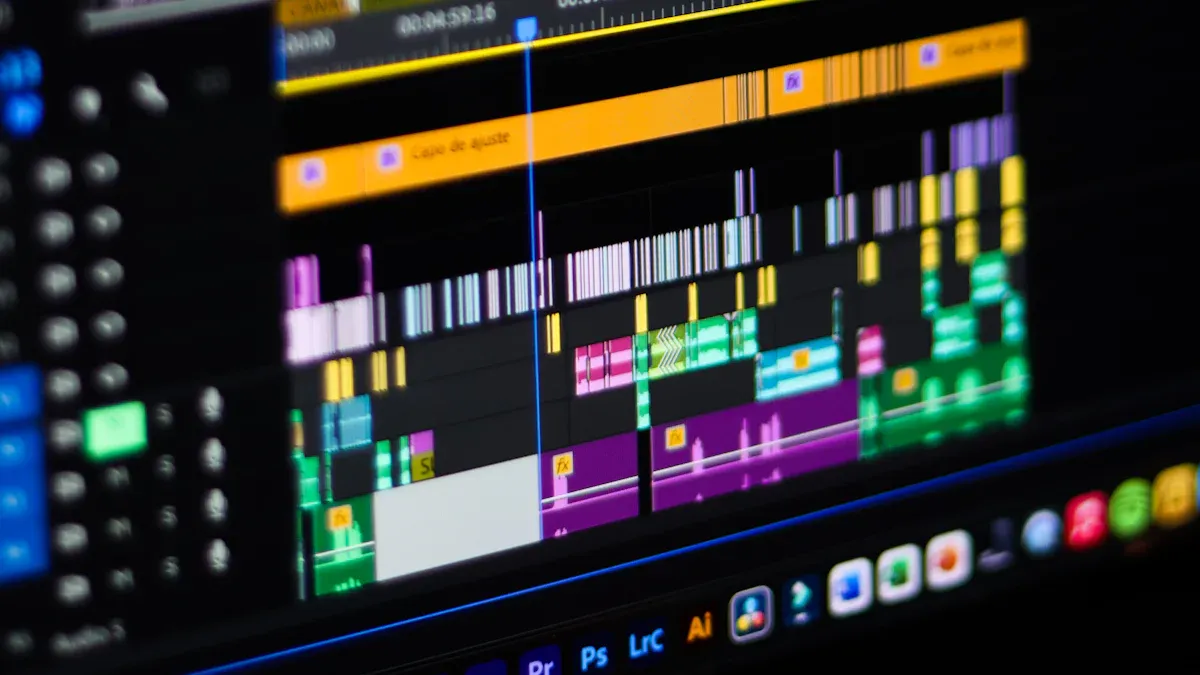
There are many sport video analysis tools you can use. Mobile apps let you record sports action anywhere you go. You can review clips and share them very fast. You get feedback right away from your team or coach. Desktop software gives you more features for deep analysis. You can work offline and keep your data safe on your computer.
Here’s how mobile apps and desktop software compare:
| Category | Mobile Apps | Desktop Software |
|---|---|---|
| You can use them anywhere with internet. They are easy to record and analyze on-the-go. The interfaces are simple for quick feedback. You can share clips fast on social media. | You can work offline without interruptions. You have better security for your data. Your computer makes the software run faster. Your data stays private on your device. | |
| Disadvantages | You need internet to use them. Storage is limited and privacy can be a problem. Add-ons and subscriptions may cost a lot. | You must install and update the software yourself. It uses space on your computer. You can only use it on the device where it is installed. |
You might pick mobile apps for quick coaching or desktop software for team reviews. Both types of sport video analysis tools help you get better at sports.
Hardware and Accessories
To get great results, you need the right hardware and accessories. Cameras help you capture fast action in sports. Tripods and head mounts keep your shots steady. Telescoping poles and dollies help you film from cool angles.
| Essential Hardware/Accessories | Description |
|---|---|
| Camera | This device captures fast action, and 4K quality makes it clear. |
| Mounting Equipment | Tripods, head mounts, and chest mounts help you shoot steady videos. |
| Filming Accessories | Telescoping poles and dollies help you film from different angles. |
You can use these tools with video analysis solutions to get the most from your sports footage.
Cloud-Based Solutions
Cloud-based sport video analysis tools help you store, share, and review sports videos anywhere. Apps like Onform let you watch frame-by-frame and use AI analysis. Hudl gives you automatic video capture and instant replay for coaching. Microsoft Sports Performance Platform tracks athlete performance with live dashboards. Dartfish lets you use slow motion, split-screen, and cloud reports.
Some features you get with cloud-based video analysis solutions are:
-
Angle and time measurements
-
Split-screen comparisons
-
Automatic tracking and trajectory analysis
-
Dynamic PowerBI cloud reports
Cloud-based tools help you work with your team, share feedback, and keep getting better at sports.
Video Analysis Features Compared
Side-by-Side Viewing
You want to see how athletes get better. Side-by-side viewing lets you watch two videos together. You can check progress and spot changes in how someone moves. Coaches use this to show athletes what needs work. Many sports video analysis tools have side-by-side viewing. This way is popular for game film and tracking performance.
| Benefit | Description |
|---|---|
| Look at old videos to see improvement. | |
| Identify Areas for Improvement | Find exact skills that need to get better. |
| Essential for Coaches and Athletes | Gives important tips for training and getting better. |
Tip: Use side-by-side viewing to show athletes their best plays next to places they can improve.
Overlays and Graphics
Overlays and graphics make your videos easier to understand. You can draw lines, circles, or arrows to point out movements. These tools help you see what is happening in the game. Overlays make hard data simple and give quick feedback. You can make shot charts or heatmaps to show where players move most.
| Aspect | Description |
|---|---|
| Shows what is happening and how players act. | |
| Simplification of Data | Makes stats easy for athletes and coaches. |
| Real-time Insights | Gives fast feedback for player roles. |
| Narrative Creation | Frames data so it is easy to use and understand. |
-
Many tools let you sort data by date, game, or player.
-
You can use overlays with event and tracking data for deeper study.
Timers and Measurement
Timers and measurement tools help you check speed, time, and movement. You can add timers to videos and pictures. These features give athletes clear feedback. Some tools let you compare up to 12 videos or record live video from many cameras.
| Feature | Description |
|---|---|
| Record from many cameras for full analysis. | |
| Timing analysis | Advanced timing for exact measurement. |
| Time, Speed and RPM measurement | Measure time, speed, and RPM to track performance. |
| Compare lots of videos at once. | |
| Live video capture | Record live action from up to 8 cameras. |
-
You can put timers at different times in the video.
-
Timers help you break down each play and coach better.
Advanced Analytics
Advanced analytics give you more details about sports performance. These tools help you tag, code, and review videos. You can use templates and work with others in real time. Some software, like Hudl and Sportscode, offer cloud storage and easy sharing. Nacsport lets you tag and report on many devices.
| Software | Key Features |
|---|---|
| Sportscode | Record, code, and review videos; templates; real-time teamwork. |
| Hudl | Advanced stats; cloud storage; easy sharing. |
| Nacsport | Tagging and reporting; works on many platforms. |
Advanced analytics make tracking performance easier and more exact.
Sharing and Collaboration
Sharing and collaboration features help teams work together. You can tag game moments and add comments for coaches. Some tools focus on technical analysis, while others make sharing simple. Hudl SportsCode gives you safe online storage. Bepro is good for sharing notes and comments.
| Platform | Collaboration Features | Focus Area |
|---|---|---|
| Spiideo Perform | Tag game moments and player actions with comments for all coaches | General coaching and analysis |
| Dartfish | Side-by-side comparisons, less focus on teamwork | Technical and biomechanical analysis |
| Metrica Sports | Special solutions with sharing options | Soccer-specific analysis |
| Hudl SportsCode | Safe online storage and sharing choices | Performance analysis |
| Bepro | Note-sharing and comments for teamwork | General video analysis |
-
Sharing features help teams learn faster and get better together.
-
Collaboration tools make coaching easier and keep everyone working as a team.
Best Apps for Sports Video Production
Top iOS and Android Picks
You want your sports videos to look great. The right video analysis apps can help you do this. Many apps work on iOS and Android devices. You can record, edit, and share sports moments on your phone or tablet. Here are some top apps you should check out:
-
Hudl Technique: You can break down movements and share clips with your team. This app helps you coach and give feedback.
-
Coach’s Eye: You get slow-motion playback and drawing tools. You can use it for training and quick analysis.
-
OnForm: You can compare videos side by side. This app gives instant feedback for practice.
-
Ubersense: You can tag key moments and add notes. It works well for coaching and team reviews.
-
Dartfish Express: You get advanced video analysis tools. You can use overlays and graphics to highlight action.
These apps help you capture every detail in sports. You can use them for soccer, basketball, tennis, or other sports. The controls are easy and sharing is fast.
Tip: Try different apps before you choose one. Some apps have free trials so you can test features for your sports needs.
Strengths and Limitations
You want to know what makes these apps good and what problems they have. Here is a quick look at their strengths and limitations:
| Strengths | Limitations |
|---|---|
| Dynamic text overlays and graphics make videos fun | Too much raw footage can be hard to handle |
| Big library of royalty-free music adds emotion | You need to deliver videos fast |
| Narration and voice-over help tell stories | Keeping videos looking the same is tough |
| Easy export in many formats for different platforms | Copyright issues with music and footage |
| AI-powered features help you edit faster | Professional apps can cost a lot |
| You can make personalized fan experiences | Social media formats change often |
You get cool features like overlays, music, and voice-overs. These make your sports videos more fun and interesting. You can export your work for social media or team meetings. Some apps use AI to help you edit faster. You can make special experiences for fans and players.
You might have some problems. Too much raw footage can be hard to manage. You need to make videos quickly, especially for live sports. Making videos look the same on every platform is tricky. Watch out for copyright issues with music. Some professional apps cost a lot. Social media keeps changing, so you need to update your videos often.
Note: Pick video analysis apps that fit your sports goals and budget. You can upgrade later as your coaching needs grow.
Professional Video Analysis Systems
Software Suites for Teams
You want your team to improve at sports. Software suites help you do this. These tools let you study games and track stats. You can share feedback with your players. Coaches use them for planning and training. Many teams use Hudl, Coach’s Eye, zone14 REPLAY App, Spiideo GO, and KlipDraw. These platforms make video analysis quick and simple.
Here’s what top software suites can do:
| Software Suite | Key Features |
|---|---|
| Siliconcoach | Pro8 helps with biomechanical analysis. You get live sharing and instant feedback for coaching. |
| Dartfish | It gives strong tactical and performance analysis. It connects with other systems and data feeds. |
| Quintic Sports | It supports professionals. You can use it for research and gait analysis in sports. |
| MotionView | It works with many cameras and data feeds. It is common in sports analysis. |
| Kinovea | It is open source. It is part of Chronojump and LongoMatch. It is free but not full coaching software. |
| Popular Features | You get side-by-side viewing, overlays, timers, and measurement tools for accuracy in sports. |
Tip: Try different software suites to see which one fits your coaching style and team needs.
Integrated Hardware Solutions
You want your work to be easy and smooth. Integrated hardware solutions help you capture and study sports action. Hudl’s cameras record games and practices by themselves. You do not need a cameraperson. The Advanced Find tool in Hudl Sportscode helps you find clips fast. Insight gives you feedback from big data right away. Catapult’s platform mixes video and data for clear insights. You can work with your team from anywhere and share ideas quickly.
-
Automated capture and analysis help you make decisions faster.
-
Hudl cameras record every player during training and matches.
-
Catapult lets coaches work together live or from far away.
-
Visualizations help you see what is happening during live sessions.
Customization Options
You want your video analysis system to fit your needs. Many platforms let you change dashboards, reports, and feedback tools. You can set up your coaching software to track the stats you care about most. Some systems let you add your own tags, notes, and graphics. This helps you focus on what matters for your team.
Note: Customization makes your coaching software better. You can change features for different sports or coaching styles.
Choosing the Right Sports Video Production Tool
User Needs and Environment
You want to pick the best sports video production tool, but where do you start? First, think about what you need and where you plan to use the tool. Your goals shape your choice. Are you a coach, an athlete, or a content creator? Each role has different needs.
You should look at these important points:
-
Usefulness: Does the tool help you reach your sports goals?
-
Usability: Can you learn it quickly? Is it easy to use during practice or games?
-
Accessibility: Can you use it on your phone, tablet, or computer?
-
Real-time updates: Does the tool give you quick and accurate information during sports events?
-
Adaptability: Can the tool handle different sports or coaching styles?
Your environment matters too. If you work outside, you need gear that can handle rain or dust. If you coach indoors, you might want tools that work well in low light. Sometimes, you need to share videos fast with your team. Other times, you want to study the footage in detail at home.
Here are some criteria you should consider when picking a tool:
| Criteria | Description |
|---|---|
| Completeness | Does the tool show the whole play or just part of it? |
| Closeness | Can you see fine details, like footwork or hand movement? |
| Smoothness | Does the video play without skipping or freezing? |
| User Preferences | Does the tool fit your habits, like using a phone or a laptop? |
| Device Constraints | Can your device handle the video quality and length you want? |
You also want to think about:
-
Screen composition: Does the tool help you frame the action well?
-
Editing skills: Can you edit clips easily, even if you are new to video?
-
Scene selection: Does the tool help you pick the best moments?
-
Commentators’ confidence: Can you add voice notes or commentary?
-
Commentary expertise: Does the tool let you share your coaching tips clearly?
Tip: Try out a few tools before you decide. Many offer free trials or demo versions. This way, you can see which one fits your sports environment and coaching style best.
Budget and Support
Your budget plays a big role in your choice. You do not need to spend a fortune to get started with sports video production. There are options for every price range.
Here is a quick look at typical budgets:
-
$1,000: You get basic equipment and a small crew. This works for youth teams or solo creators.
-
$10,000: You can add more cameras, better editing software, and a bigger team. This is good for schools or local clubs.
-
$100,000: You get high-end gear, a full crew, and advanced editing tools. Pro teams and big events use this level.
You should also think about support. Good support helps you solve problems fast. Many companies offer help with:
-
Budget planning for equipment and crew
-
Training on how to use the tools
-
Help with editing and sharing videos
-
Updates and new features for your software
Note: Look for coaching tools that offer strong customer support. This makes your job easier, especially when you run into tech issues during sports events.
If you want to get the most from your coaching tools, match your budget to your needs. Start small if you are new to sports video production. As your skills grow, you can upgrade your tools and add more features. Always check if the company offers training or a help center. This saves you time and stress.
Choosing the right sports video production tool is all about knowing your needs, your environment, and your budget. When you find the right fit, you make coaching and sports analysis easier and more fun.
You want to get the most from sports video production tools. Matching your tools to your goals helps you review performance quickly, boost team communication, and motivate players. Here’s what you should remember:
-
You can improve sports analysis by starting with a wide-angle view and zooming in on key plays.
-
Quick reviews after games help your team learn fast.
-
Team collaboration grows when everyone shares feedback.
If you’re just starting, pick user-friendly sports tools. Coaches should talk with their staff to set clear coaching needs and communication styles. Professionals need streamlined workflows to focus on effective coaching. Stay curious about new sports technology and trends. Try demos or free trials to find what fits your coaching style.
FAQ
What is the best camera for beginners in sports video production?
You can start with your smartphone or a budget-friendly camera like the Panasonic Lumix GH5. These options give you good video quality and easy controls. You do not need fancy gear to capture great sports moments.
Can I use free software for sports video analysis?
Yes! You can try free tools like Kinovea or GoPro Studio. These apps let you review footage, add simple effects, and share clips. They work well for youth teams or personal training.
How do I share sports videos with my team?
You can upload your videos to cloud platforms like Hudl or Google Drive. Many apps let you send links or share clips directly with your team. This makes feedback and teamwork much easier.
Do I need special hardware for video analysis?
You do not need expensive hardware to get started. A good camera, a tripod, and your computer or phone work well. As you grow, you can add more gear for better results.
What features should I look for in sports video apps?
Look for these features:
-
Slow-motion playback
-
Side-by-side comparison
-
Drawing tools for feedback
-
Easy sharing options
Tip: Try a few apps to see which features help you most.
2026 Sports Production Stack: What Actually Matters
Sports video tools are only useful if they survive speed, noise, distance, bad weather, and a schedule that does not care about your feelings. The best stack usually combines a reliable camera plan, stable support, clean audio from the sports microphone guide, enough storage, a fast editing workflow, and a delivery system that can turn clips around while the game is still relevant.
| Layer | Good choice | Why it matters | Upgrade when |
|---|---|---|---|
| Capture | Hybrid/cinema body, action cam, or drone depending on access | The angle has to match the sport and credential limits | You miss key moments or need cleaner low-light/action |
| Support | Monopod, tripod, shoulder rig, or gimbal | Sports footage fails fast when the operator is fighting the rig | Long games are wearing out the shooter |
| Audio | Shotgun, wireless, recorder, or board feed | Crowd, coach, and ambience sell the edit | The camera mic is doing all the emotional labor |
| Editing | Templates, ingest folders, proxies, and fast exports | Speed wins after the event | Turnaround time is costing posts or clients |
| Delivery | Cloud links, social crops, archive structure | The footage needs to be findable after the adrenaline wears off | The team asks for the same clip three weeks later |
For buyer-intent gear refreshes, use the Prime Day creator gear watchlist and camera deal watchlist to check whether a sale changes the decision. Do not buy a tool because it is discounted; buy it because it removes a bottleneck in capture, audio, stabilization, edit speed, or delivery.


